A tetroid game in Coal
About this tutorial
At first glance, Coal’s restrictions may seem to make it next to impossible to write any useful programs at all. The goal of this tutorial is therefore to show how to do more interesting things than just compute factorials. Here we will develop a minimal Tetris-like game in Coal. Through this concrete example, we will demonstrate how Coal’s programming model can be applied to something practical. (And what could be more practical than Tetris?) We will deal with several concepts found in “real” programs, including state management, user input, event handling, and interaction with the outside world (I/O). There are a few ideas that lead us to approach these concepts differently from how we would develop the game in other programming languages:
- Declarativeness: Coal requires programs to be written in a declarative way: we describe what each part of the game is, rather than giving a sequence of instructions describing what the program does.
- Purity: The code is mostly pure, with two exceptions: I/O is necessary to render the game in the terminal and to acquire a random seed from the underlying C runtime. The seed ensures that the sequence of pieces is different for each game.
- Totality: Since every function must terminate and return a value for all possible inputs, infinite loops cannot be expressed in a trivial way in Coal. Instead, computations that continue indefinitely are modeled using corecursion and streams. This leads to the distinction between data and codata.
The tutorial assumes that you are already somewhat familiar with the basic idea of Tetris; if not, you may want to research the game before continuing. Please note that we will try to follow the rules and terminology of the original game as closely as practically possible, but don't expect a genuine clone of any particular version of the game.
In this first crude version, a small C runtime will be used to draw the game in the terminal. A future version could replace the terminal interface with a more polished desktop or browser-based UI.
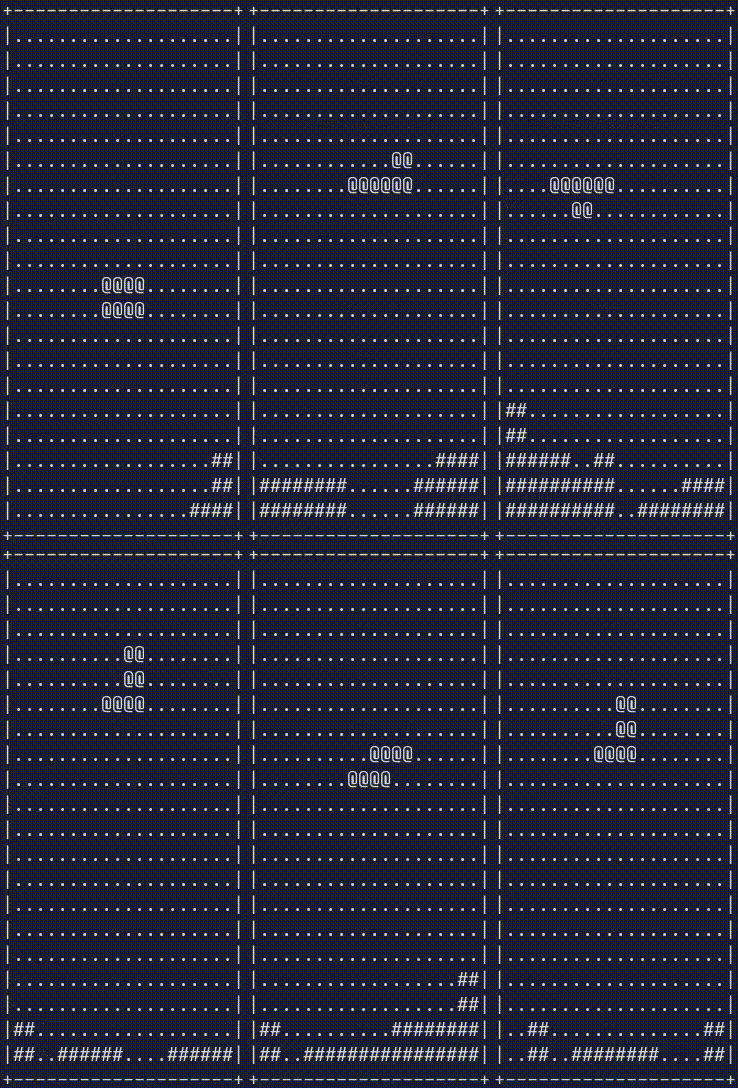
The source code of the game and this document are available here.
Parts
Before we go ahead and create the actual game loop and the code that responds to user input and other events, let's look at the different building blocks that make up the game — the tetromino shapes, their rotations, the falling piece, the board, and the game state that ties it all together. In this section we will work out how to represent each of these in code. It makes sense to keep these representations as simple as possible, since every other part of the program will be written in terms of them.
Numeric types
Coal has several numeric types. In this example, we'll mostly use
int32andnatto represent numeric values.
int32is Coal's fixed-width 32-bit integer type. In the game, it is used for coordinates and for values passed to or received from C functions.natis the type of natural numbers, used for sizes and indices (List.length,range,remove_source). See Natural numbers in the language manual for a more detailed explanation.- Some functions convert between these two using
Nat.to_natandNat.pack.
Tetrominoes
The central element of the game is the tetromino. A tetromino is a geometric shape made up of four equally-sized squares connected edge-to-edge. There are seven distinct tetrominoes, conventionally named I, O, T, S, Z, J, and L.
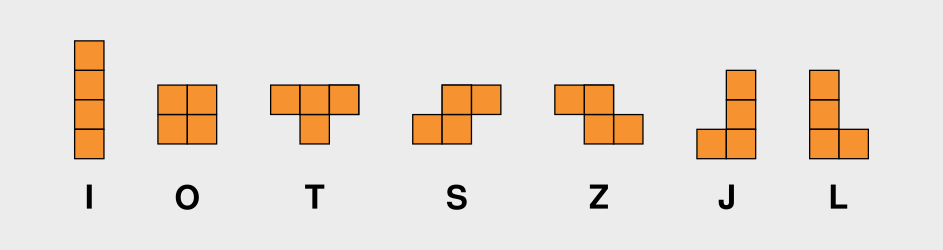
In code, we will represent a tetromino using the following data type:
type Tetromino
  = ShapeI
  | ShapeO
  | ShapeT
  | ShapeS
  | ShapeZ
  | ShapeJ
  | ShapeLtype Tetromino
  = ShapeI
  | ShapeO
  | ShapeT
  | ShapeS
  | ShapeZ
  | ShapeJ
  | ShapeL
Explainer
The
typekeyword in Coal introduces a new algebraic data type. Algebraic data types can be constructed in two ways: using products and sums. A sum is a choice between alternatives: a value belongs to exactly one of the specified constructors. See the Data types section of the language manual for a more detailed explanation.
Orientations
A tetromino can have one of four rotation states, or orientations: 0°, 90°, 180°, or 270°. Here is what the L tetromino looks like in each of these states:
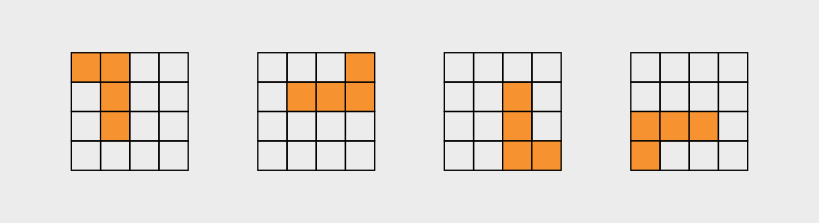
Orientation is also straightforward to represent as a sum-type:
type Orientation
  = R0
  | R90
  | R180
  | R270type Orientation
  = R0
  | R90
  | R180
  | R270
Some tetrominoes have rotational symmetry. For example, rotating the O doesn't change its shape. In the game, however, we still represent the four states explicitly, since the orientation of a piece determines which cells of the board it occupies.
We need a function to change the orientation stepwise when the up key is pressed:
fun rotate | R0 => R90 | R90 => R180 | R180 => R270 | R270 => R0fun rotate | R0 => R90 | R90 => R180 | R180 => R270 | R270 => R0
Explainer
This syntax defines a top-level function using a list of patterns and the corresponding expressions, without explicitly naming the function argument. It is equivalent to a
matchexpression:fun rotate(orientation : Orientation) = match(orientation) { | R0 => R90 | R90 => R180 | R180 => R270 | R270 => R0 }fun rotate(orientation : Orientation) = match(orientation) { | R0 => R90 | R90 => R180 | R180 => R270 | R270 => R0 }
Pieces
A piece represents a tetromino located at a given position and in a particular orientation on the board. It is convenient to represent it using a record, since it has multiple properties:
type alias Piece =
  { tetromino : Tetromino
  , orientation : Orientation
  , pos_x : int32
  , pos_y : int32
  }type alias Piece =
  { tetromino : Tetromino
  , orientation : Orientation
  , pos_x : int32
  , pos_y : int32
  }
Explainer
A record in Coal is formed by a sequence of comma-separated fields enclosed in curly braces. Each field has a name, called its label, and a value:
{ shape = "octagon"
, edges = 8
}{ shape = "octagon"
, edges = 8
}
The type of a record is described using a similar syntax, but specifies a type for each field instead of a value:
{ shape : string
, edges : int32
}{ shape : string
, edges : int32
}
We also give this type a name using a type alias. This makes it possible to refer to it simply as
Pieceinstead of repeating the whole thing. See the language manual for a more detailed overview of records, and type aliases.
Active piece
There is one special piece in the game, namely the one that is currently controlled by the player. We refer to this as the active piece. The following default piece is used as a template when updating the active piece:
let default_piece : Piece =
  { tetromino = ShapeI
  , orientation = R0
  , pos_x = 3
  , pos_y = 0
  }let default_piece : Piece =
  { tetromino = ShapeI
  , orientation = R0
  , pos_x = 3
  , pos_y = 0
  }
Since the Tetromino type on its own doesn't contain any information about the geometry of the tetromino it represents, we need a mapping from pieces to the cells they occupy. We define that mapping in Tetromino cells.
The board
The board is where the game takes place. It is a 10 × 20 grid, whose elements we will refer to as cells. Each cell is either empty or occupied.
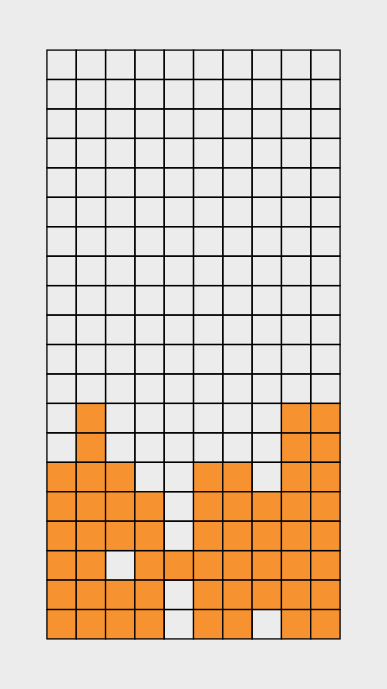
In the code, we keep this as simple as possible. We represent a cell as a pair (int32, int32) holding its x and y coordinates. The board is then simply a set of cells — those that are currently occupied:
type alias Board = Set<(int32, int32)>type alias Board = Set<(int32, int32)>
The active piece is not part of the Board; it is merged into the board when it lands.
When the game starts, the board is empty:
let empty_board : Board =
  Containers.Set.emptylet empty_board : Board =
  Containers.Set.empty
Explainer
Setis an immutable balanced tree, part of thecoal-containerspackage. Note that theSetmodule is imported qualified:import namespace Containers.Setimport namespace Containers.SetThat is why we need to write
Containers.Set.emptyhere, as opposed to justempty.
GameState
The game state is a record containing everything the game needs to keep track of while it is running. This is:
- The
Board. - The currently active
Piece. - A
Stream<Piece>that supplies the pieces the game draws from.
type alias GameState =
  { board : Board
  , active_piece : Piece
  , piece_supply : Stream<Piece>
  }type alias GameState =
  { board : Board
  , active_piece : Piece
  , piece_supply : Stream<Piece>
  }
Explainer
A
Stream<a>is codata: unlike a list, which is finite, a stream is a potentially infinite sequence produced lazily, one element at a time. You consume it withhead(the next element) andtail(the rest), both fromCodata.Stream;repeat(x)yieldsxforever. This is how the game models an endless supply of pieces without writing an infinite loop.
We also define a default game state to use as a starting point:
let default_game_state =
  { board = empty_board
  , active_piece = default_piece
  , piece_supply = repeat(default_piece)
  }let default_game_state =
  { board = empty_board
  , active_piece = default_piece
  , piece_supply = repeat(default_piece)
  }
Here repeat(default_piece) is a placeholder supply that yields the same piece forever. It is replaced with a real, randomly generated supply when the game starts, in main.
Next, let's see how the piece_supply field of the game state is built. It is the one part of the state that is generated rather than derived from the player's actions.
Piece supply
When a falling piece reaches the bottom of the board or lands on another block, it locks into place. A new piece then spawns at the top of the board. To keep generating new pieces throughout the game, we need two random streams:
-
One for the tetrominoes:

-
And one for the orientations:

For these, we are going to use the coal-random package and the pick function, which returns a stream of random elements drawn from a non-empty list of elements.
-
Stream<Tetromino>:pick(seed, Cons(ShapeI, [ShapeO, ShapeT, ShapeS, ShapeZ, ShapeJ, ShapeL])),pick(seed, Cons(ShapeI, [ShapeO, ShapeT, ShapeS, ShapeZ, ShapeJ, ShapeL])), -
Stream<Orientation>:pick(seed, Cons(R0, [R90, R180, R270]))pick(seed, Cons(R0, [R90, R180, R270]))
Explainer
The
NonEmptyListdata type used here is part of thecoal-containerspackage. A stream cannot be empty, so to generate one from a list, that list needs to have at least one element. Under the hood, aNonEmptyListis just an ordinary list coupled with an extra element:type NonEmptyList<a> = Cons(a, List<a>)type NonEmptyList<a> = Cons(a, List<a>)
The first argument to pick is an opaque seed responsible for initializing the pseudorandom number generator.
Since pick is a pure function, the same seed always produces the same sequence of numbers.
To make each game unique we can generate a fresh seed derived from the system clock.
That way the player experiences some actual randomness.
random_seed : unit -> IO<Seed>random_seed : unit -> IO<Seed>
The function map2_stream takes a Stream<a> and a Stream<b> and fuses them into a Stream<c>.
Its first argument is a function a -> b -> c that describes how each a, b element-pair is combined.
map2_stream is exactly what we need in order to combine tetrominoes and orientations into a Stream<Piece>:
fun piece_supply(seed) =
  map2_stream(
    fn(tetromino, orientation) =>
      default_piece{ tetromino = tetromino, orientation = orientation },
    pick(seed, Cons(ShapeI, [ShapeO, ShapeT, ShapeS, ShapeZ, ShapeJ, ShapeL])),
    pick(seed, Cons(R0, [R90, R180, R270]))
  )fun piece_supply(seed) =
  map2_stream(
    fn(tetromino, orientation) =>
      default_piece{ tetromino = tetromino, orientation = orientation },
    pick(seed, Cons(ShapeI, [ShapeO, ShapeT, ShapeS, ShapeZ, ShapeJ, ShapeL])),
    pick(seed, Cons(R0, [R90, R180, R270]))
  )
Explainer
The expression
default_piece{ tetromino = tetromino, orientation = orientation }is a partial update that makes a copy of thedefault_piecerecord, replacing only thetetrominoandorientationfields.
Mechanics
Updating the board
Many of the functions used to update the game operate on GameState values.
They all take a GameState, sometimes together with other arguments, and return a new GameState reflecting the action we want to perform.
Most of these updates involve changing the Board.
When a piece lands, for example, we need to add its cells to the board.
We may also need to clear one or more completed rows and shift the rows above the cleared rows down.
To get an idea of how this works, here is the function that removes one specific row from the board:
fun board_remove_row(y : int32, board : Board) =
  List.reduce_left(
    fn(acc, x) => Containers.Set.delete((x, y), acc),
    board,
    range(0, 10)
  )fun board_remove_row(y : int32, board : Board) =
  List.reduce_left(
    fn(acc, x) => Containers.Set.delete((x, y), acc),
    board,
    range(0, 10)
  )
We also need functions to check which cells are occupied and to query the board in other ways.
The board API defines these along with the functions for updating the board (including board_remove_row, which we have already seen in full).
To keep things short, we'll show only the types of these functions, leaving out their implementations.
Take a look at the source code if you're interested in the details.
Reminder
A function with multiple arguments, like
f(x : int32, y : int32) : bool, is curried, so its type is written with arrows:int32 -> int32 -> bool. A function that takes a single pair treats that pair as one type, as in(int32, Board) -> Board.
Looking up and adding cells
These functions work with individual cells. Pretty much everything else is built on top of them:
fun is_board_member(cell : (int32, int32), board : Board) : bool
fun board_insert(cell : (int32, int32), board : Board) : Board
fun board_insert_cells(cells : List<(int32, int32)>, board : Board) : Board
fun board_cell_is_set(cell : (int32, int32), game_state : GameState) : boolfun is_board_member(cell : (int32, int32), board : Board) : bool
fun board_insert(cell : (int32, int32), board : Board) : Board
fun board_insert_cells(cells : List<(int32, int32)>, board : Board) : Board
fun board_cell_is_set(cell : (int32, int32), game_state : GameState) : bool
is_board_memberhas type(int32, int32) -> Board -> bool. It takes a cell (a pair of coordinates) and the board, and returns whether the cell is currently occupied.board_inserthas type(int32, int32) -> Board -> Board. It takes a cell and the current board, and returns a board with the cell added.board_insert_cellshas typeList<(int32, int32)> -> Board -> Board. It adds all cells in the list to the board. This is useful when a piece locks into place, since it occupies four cells.board_cell_is_sethas type(int32, int32) -> GameState -> bool. It checks whether a cell is occupied in the board contained in aGameState. This is a convenience for collision-checking functions, which can pass theGameStatedirectly instead of first extractingstate.board.
Recall that a cell is just a pair (int32, int32) and that the Board is a Set of those pairs.
So is_board_member and board_insert are really just thin wrappers around the matching Set operations.
Counting, removing, and shifting rows
Clearing a completed line means inspecting and rearranging whole rows, so we need a few row helpers. A row is identified by its y-coordinate, and the columns run from 0 to 9. (Note that range(0, 10) is how we write those ten columns: the second argument to range is a count, not an upper bound, so range(0, 10) is the list [0, 1, …, 9].)
fun board_count_in_row(y : int32, board : Board) : int32
fun board_shift_row(y : int32, board : Board) : Board
fun board_shift_rows_above(cleared_y : int32, board : Board) : Boardfun board_count_in_row(y : int32, board : Board) : int32
fun board_shift_row(y : int32, board : Board) : Board
fun board_shift_rows_above(cleared_y : int32, board : Board) : Board
board_count_in_rowhas typeint32 -> Board -> int32. It counts how many cells are filled in rowy— somewhere between 0 and 10. Once that count hits 10, the row is full and should be cleared.board_shift_rowhas typeint32 -> Board -> Board. It moves every filled cell in rowydown one, into rowy + 1, which closes that gap.board_shift_rows_abovehas typeint32 -> Board -> Board. It shifts every row abovecleared_ydown by one, so the whole stack resting on the cleared line falls into place.
Note
This works only because
reduce_leftfolds the list right-to-left: the range[0, …, cleared_y - 1]is therefore consumed fromcleared_y - 1down to0. Processing the rows in the other direction would shift the same cells repeatedly and collapse the stack.
Clearing completed lines
The row helpers come together in a small clearing algorithm:
fun board_clear_step(pair : (int32, Board)) : (int32, Board)
fun board_clear_full_rows(board : Board) : Boardfun board_clear_step(pair : (int32, Board)) : (int32, Board)
fun board_clear_full_rows(board : Board) : Board
board_clear_stephas type(int32, Board) -> (int32, Board). It does one step of the scan. You hand it a row indexypaired with a board, and it either finds rowyfull — in which case it removes that row and shifts the rows above it down — or, if the row isn't full, just moves on toy - 1. It carries the board and the row index around together, because that pair is all the state the scan needs from one step to the next.board_clear_full_rowshas typeBoard -> Board. It runsboard_clear_stepover and over, starting at the bottom row (index 19) and working its way up, until it has checked the whole board, then gives you back the result.
Explainer
let (_, result_board) =
  iterate(50, board_clear_step, (19, board))
in
  result_boardlet (_, result_board) =
  iterate(50, board_clear_step, (19, board))
in
  result_board
Since Coal has no general recursion, repetition is achieved here using the
iteratecombinator fromCoal.Combinators, which applies a function a fixed number of times. We just pick a bound that is big enough to cover every row of the board.The bound is 50 rather than 20 because a row that gets cleared stays at the same index (so it can be re-examined) and the scan also needs one step per row to walk to the top. The bound for
drop_to_bottom(30) only has to exceed the board height of 20.
Translating the board
Last but not least, we need a way to turn the board into a plain list, since that is what the renderer expects:
fun board_to_list(board : Board) : List<(int32, int32)> =
  Containers.Set.to_list(board)fun board_to_list(board : Board) : List<(int32, int32)> =
  Containers.Set.to_list(board)
Cells
Cells are like the atoms in the universe of this game. They are also commonly referred to as blocks or minos in Tetris terminology. The functions here operate at the cell level to manipulate or peek at the cells of a piece. These will be essential later for collision checks, which determine whether the active piece would overlap with anything on the board, and for rendering, which needs to know which cells to draw.
Tetromino cells
As previously mentioned, the Tetromino type on its own doesn't say anything about the actual geometry of the shape it represents. It is just an identity.
To move and land the currently active piece, the game needs a way to figure out the cells it occupies from its shape, orientation, and position.
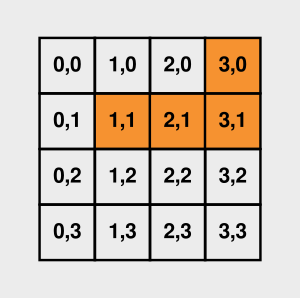
The function tetromino_cells does most of this for us — it takes a Tetromino and an Orientation and returns a Set<(int32, int32)> of cells.
For example, for ShapeL and R90 it contains the following cells (shown as a list for readability; a Set itself is unordered):
[ (3, 0), (1, 1), (2, 1), (3, 1) ]
Explainer
In the source,
tetromino_cellsis written asContainers.Set.from_list .| match(tetromino) { … }..|is the forward application operator, the mirror image of the|.used later:x .| fmeansf(x), which lets a value head a pipeline of transformations.
Shifting cells
To get the actual cells the piece occupies on the board, we then offset these coordinates by its x and y position.
fun translate_cell(d_x : int32, d_y : int32, (cell_x, cell_y) : (int32, int32)) : (int32, int32)
fun translate_cells(d_x : int32, d_y : int32, cells : List<(int32, int32)>) : List<(int32, int32)>fun translate_cell(d_x : int32, d_y : int32, (cell_x, cell_y) : (int32, int32)) : (int32, int32)
fun translate_cells(d_x : int32, d_y : int32, cells : List<(int32, int32)>) : List<(int32, int32)>
These functions handle the coordinate arithmetic.
translate_cellhas typeint32 -> int32 -> (int32, int32) -> (int32, int32). It takes a horizontal stepd_x, a vertical stepd_y, and a cell, and returns the cell shifted by that amount:(cell_x + d_x, cell_y + d_y).translate_cellshas typeint32 -> int32 -> List<(int32, int32)> -> List<(int32, int32)>. This function performs the same translation on all cells in the given list.
Explainer
fun translate_cells(d_x : int32, d_y : int32, cells : List<(int32, int32)>) =
  List.map(translate_cell(d_x, d_y), cells)fun translate_cells(d_x : int32, d_y : int32, cells : List<(int32, int32)>) =
  List.map(translate_cell(d_x, d_y), cells)
The expression
translate_cell(d_x, d_y)is a partially applied function. It produces a function that takes a cell and translates it, which is exactly whatList.mapexpects.
Turning a piece into cells
The last function brings the two together:
fun active_piece_cells(game_state : GameState) : List<(int32, int32)>fun active_piece_cells(game_state : GameState) : List<(int32, int32)>
active_piece_cellshas typeGameState -> List<(int32, int32)>. It pulls the active piece out of the game state, looks up the cells of its shape withtetromino_cells, and shifts each one by the piece's position. The result is the list of board coordinates the piece currently covers. Since the shape comes back as aSet, it's first converted to a list so that the renderer and the collision checks can walk over it.
Collisions
Collision detection is the process of determining whether two objects overlap or occupy the same space.
We need this to determine whether a piece can move or rotate without overlapping existing blocks or moving outside the playfield.
The following functions inspect the game state to perform these collision checks and return a bool.
fun cell_collides((x, y) : (int32, int32), game_state : GameState) : bool
fun cells_collide(cells : List<(int32, int32)>, game_state : GameState) : boolfun cell_collides((x, y) : (int32, int32), game_state : GameState) : bool
fun cells_collide(cells : List<(int32, int32)>, game_state : GameState) : bool
cell_collideshas type(int32, int32) -> GameState -> bool. It takes a cell and a game state, and returns whether the cell is an invalid position — either because it lies outside the playfield or because it is already occupied by a block.cells_collidehas typeList<(int32, int32)> -> GameState -> bool. It checks a list of cells and returnstrueif any of them collides, usingList.anywithcell_collides. This is the function used by the movement code, since a piece occupies four cells.
Explainer
cells_collideisList.anyover the piece's cells,translate_cellsisList.map, andboard_remove_rowis areduce_left. Much of what looks like an algorithm here is a single library combinator applied to a list.
The bounds test spells out the playfield we described earlier: a cell's x-coordinate runs from 0 to 9 and its y-coordinate from 0 to 19, so x < 0, x >= 10, and y >= 20 all count as collisions. There's no y < 0 check, though — the top edge isn't a wall, so a piece is free to poke out above the board.
Movements
The next thing to tackle is moving the piece around. Without movement the game wouldn’t be very interesting. The first two functions don't move anything — they only check if a move is possible. They both rely on the collision checks from the previous section.
fun can_move(d_x : int32, d_y: int32, state : GameState) : bool
fun can_rotate(state : GameState) : boolfun can_move(d_x : int32, d_y: int32, state : GameState) : bool
fun can_rotate(state : GameState) : bool
can_movetakes the cells occupied by the active piece, translates them byd_xsteps horizontally andd_ysteps vertically, and passes the result tocells_collideto test for collisions. It returnstrueif the move is possible.can_rotatehas typeGameState -> bool. Instead of translating the current cells, it usestetromino_cellsto calculate the cells occupied by the piece in its next orientation, then translates them to the piece's current position. It passes these cells tocells_collideand returnstrueif the rotated piece fits without a collision.
Making the move
To actually move the piece, there are two functions similar to those we have already seen:
fun move_active_piece(d_x : int32, d_y : int32, state : GameState) : GameState
fun rotate_active_piece(state : GameState) : GameStatefun move_active_piece(d_x : int32, d_y : int32, state : GameState) : GameState
fun rotate_active_piece(state : GameState) : GameState
move_active_piecehas typeint32 -> int32 -> GameState -> GameState. It returns a new game state whose active piece has been nudged by(d_x, d_y).rotate_active_piecehas typeGameState -> GameStateand returns an updated state with the active piece's orientation advanced one step byrotate.
Guarded moves
Finally, we define the functions that the event handlers call — one for each direction of movement, plus rotation:
fun move_left(state : GameState) : GameState
fun move_right(state : GameState) : GameState
fun move_down(state : GameState) : GameState
fun rotate_active(state : GameState) : GameStatefun move_left(state : GameState) : GameState
fun move_right(state : GameState) : GameState
fun move_down(state : GameState) : GameState
fun rotate_active(state : GameState) : GameState
- These all have type
GameState -> GameStateand rely on thecan_moveandcan_rotateutilities to determine whether the active piece can move or rotate. If the move is valid, they return a newGameStatewith the piece in its new position or orientation. Otherwise, the state remains unchanged.
fun move_left(state : GameState) =
  if (can_move(-1, 0, state)) then move_active_piece(-1, 0, state) else statefun move_left(state : GameState) =
  if (can_move(-1, 0, state)) then move_active_piece(-1, 0, state) else state
Note
move_left,move_right, androtate_activeare wired directly to their keys inhandle_event. The down key is the exception: it is mapped totickrather than tomove_down. The difference shows up at the bottom of the stack —move_downwould simply do nothing once the piece can no longer fall, whereasticklands the piece, so a single press of the down key can lock it in place.
Piece locking and drops
Eventually, the active piece has to land. The functions under this section handle the landing process — they lock the piece into the board, clear any completed rows, and select the next piece from the supply.
We’ll also look at two drop functions that move the active piece straight down as far as it can go, and at tick, which moves it down one row on each timer tick.
Locking and spawning
fun lock_active_piece(state : GameState) : GameState
fun spawn_next_piece(state : GameState) : GameStatefun lock_active_piece(state : GameState) : GameState
fun spawn_next_piece(state : GameState) : GameState
lock_active_piecehas typeGameState -> GameState. It works out the cells the active piece currently covers withactive_piece_cells, adds them all to the board withboard_insert_cells, and returns a new state with that updated board. It leaves the active piece itself where it is.spawn_next_piecehas typeGameState -> GameState. It takes the next piece off the front ofpiece_supplyand makes it the new active piece, returning the state with the supply advanced by one (itstail). This is the one place the piece supply gets consumed.
Landing
fun on_piece_landed(state : GameState) : GameStatefun on_piece_landed(state : GameState) : GameState
on_piece_landedhas typeGameState -> GameState. This is the whole landing sequence in one function: lock the piece, clear any completed rows from the board (board_clear_full_rows), and then spawn the next piece. The last step comes with a safety check — if the freshly spawned piece collides with the board straight away, the stack has reached the top, so it keeps the cleared board and discards the new piece. No further pieces are spawned after that, so play effectively stops (the loop itself keeps running, though — see Next steps).
That final if is the "topped out" test. A new piece always appears near the top, so if it can't fit there without overlapping, the player has run out of room.
Dropping the piece
fun drop_to_bottom(state : GameState) : GameState
fun hard_drop(state : GameState) : GameStatefun drop_to_bottom(state : GameState) : GameState
fun hard_drop(state : GameState) : GameState
drop_to_bottomhas typeGameState -> GameStateand nudges the piece down one row at a time until it can't move any further. It reuses theiteratefunction we saw for clearing rows: "move down if you can", applied a fixed number of times (30, comfortably more than the board is tall).hard_drophas typeGameState -> GameState. It's the complete action: drop the piece to the bottom, then land it withon_piece_landed. This is the one the space bar triggers.
Gravity
fun tick(state : GameState) : GameStatefun tick(state : GameState) : GameState
tickhas typeGameState -> GameState. It is called on every timer tick to move the active piece down one row. If the piece cannot move down,tickinstead callson_piece_landedto land the piece.
Events
We now have the machinery to update the game state. The functions we have already covered handle everything that happens during the game.
What we're left with now is the game loop that drives the application.
We will use the coal-event-source library and its event loop system to receive user input and handle other events. Specifically, the loop will need to:
- Trigger a tick event at regular intervals to update the board. Each tick will move the active piece one position down (simulating gravity).
- To make the game more challenging, this interval should decrease over time. For now, however, we will use a constant interval.
- Listen for key press events:
- The left and right arrow keys move the piece in the respective direction.
- The up arrow key rotates the piece.
- The down arrow key manually moves the piece down.
- The space key initiates a hard drop.
- The escape key exits the game.
- Render the UI each time the game state changes.
Based on this list, we define a GameEvent type that enumerates the different events that the game needs to pay attention to during gameplay:
type GameEvent
  = KeyLeft
  | KeyRight
  | KeyDown
  | KeyUp
  | KeySpace
  | KeyEsc
  | KeyOther
  | Ticktype GameEvent
  = KeyLeft
  | KeyRight
  | KeyDown
  | KeyUp
  | KeySpace
  | KeyEsc
  | KeyOther
  | Tick
We need a function that takes a raw key code and translates it to a GameEvent.
fun parse_kbd_event : int32 -> GameEvent
  | 68 => KeyLeft
  | 67 => KeyRight
  | 66 => KeyDown
  | 65 => KeyUp
  | 32 => KeySpace
  | 27 => KeyEsc
  | _  => KeyOtherfun parse_kbd_event : int32 -> GameEvent
  | 68 => KeyLeft
  | 67 => KeyRight
  | 66 => KeyDown
  | 65 => KeyUp
  | 32 => KeySpace
  | 27 => KeyEsc
  | _  => KeyOther
If we wanted to make it possible to, for example, pause the game by pressing any of the available keys, then it is easy to extend this function, along with the GameEvent type.
Reminder
Keep in mind that Coal is total. Pattern matching must therefore be exhaustive. That is why we need the extra wildcard pattern in the last clause.
That is the complete event vocabulary. Next we will see how these events are handled, and how the loop that delivers them is assembled.
Event handling
Handlers
With these bits in place, the game loop itself becomes really simple.
At its core is an event handler — a function that is called whenever a GameEvent occurs and updates the game state accordingly.
The actual game logic is managed by the functions we have already defined.
We wrap each result in either a Continue or Stop constructor. They belong to the StepResult<e, s> type:
type StepResult<e, s>
  = Continue(s)
  | Stop(s)
  | AddSource(Source<e>, Handler<e, s>, s)
  | RemoveSource(nat, s)type StepResult<e, s>
  = Continue(s)
  | Stop(s)
  | AddSource(Source<e>, Handler<e, s>, s)
  | RemoveSource(nat, s)
The event loop library requires the handler to return a value of this type to inform the loop what to do after processing the event.
Apart from this, handling an event mostly comes down to updating the game state using the right GameState -> GameState function.
fun handle_event(event : GameEvent, state : GameState) : StepResult<Event, GameState> =
  match(event) {
    | KeyLeft =>
        Continue(move_left(state))
    | KeyRight =>
        Continue(move_right(state))
    | KeyDown =>
        Continue(tick(state))
    | KeyUp =>
        Continue(rotate_active(state))
    | KeySpace =>
        Continue(hard_drop(state))
    | Tick =>
        Continue(tick(state))
    | KeyEsc =>
        Stop(state)
    | KeyOther =>
        Continue(state)  // Do nothing
  }fun handle_event(event : GameEvent, state : GameState) : StepResult<Event, GameState> =
  match(event) {
    | KeyLeft =>
        Continue(move_left(state))
    | KeyRight =>
        Continue(move_right(state))
    | KeyDown =>
        Continue(tick(state))
    | KeyUp =>
        Continue(rotate_active(state))
    | KeySpace =>
        Continue(hard_drop(state))
    | Tick =>
        Continue(tick(state))
    | KeyEsc =>
        Stop(state)
    | KeyOther =>
        Continue(state)  // Do nothing
  }
There is one thing missing, though: GameEvent is our vocabulary, whereas coal-event-source delivers its own built-in events — KeyEvent(int32), TickEvent, and TimeoutEvent. The handlers registered with the loop receive those raw events and translate them into a GameEvent before forwarding them to handle_event. (This is also why handle_event returns StepResult<Event, GameState>: the e in StepResult<e, s> stays the library's Event type.)
Tick events
For tick events we use this “raw” handler:
tick_event_handler : GameState -> IO<StepResult<Event, GameState>>tick_event_handler : GameState -> IO<StepResult<Event, GameState>>
There is no payload to process. We just call handle_event with a Tick along with the state:
fun tick_event_handler(state : GameState) : IO<StepResult<Event, GameState>> =
  return(handle_event(Tick, state))fun tick_event_handler(state : GameState) : IO<StepResult<Event, GameState>> =
  return(handle_event(Tick, state))
Explainer
IO<a>is the type of an effectful computation that produces ana.return(x)wraps a pure value, andand_then(io, fn(x) => …)sequences one effect into the next. Handlers are typed… -> IO<StepResult<…>>because reading a key or waiting on a timer touches the outside world, while the state transition itself stays pure.
Keyboard events
Keyboard events are not that different, except that we now receive a raw int32 key code:
keyboard_event_handler : GameState -> int32 -> IO<StepResult<Event, GameState>>keyboard_event_handler : GameState -> int32 -> IO<StepResult<Event, GameState>>
This is where the parse_kbd_event helper we defined earlier comes in handy; it creates a GameEvent from the key code:
fun keyboard_event_handler(state : GameState, key_code : int32) : IO<StepResult<Event, GameState>> =
  return(handle_event(parse_kbd_event(key_code), state))fun keyboard_event_handler(state : GameState, key_code : int32) : IO<StepResult<Event, GameState>> =
  return(handle_event(parse_kbd_event(key_code), state))
Creating and running the loop
The event loop itself is represented by a record with two fields: a list of sources and a list of sinks. A source produces events that the event loop processes, such as mouse or keyboard input. A sink receives the results of processing those events.
In this application, the terminal UI is the only sink.
type alias EventLoop<e, s> =
  { sources : List<(Source<e>, Handler<e, s>)>
  , sinks : List<Sink<s>>
  }type alias EventLoop<e, s> =
  { sources : List<(Source<e>, Handler<e, s>)>
  , sinks : List<Sink<s>>
  }
Initially, the EventLoop record will be empty:
{ sources = [], sinks = [] }{ sources = [], sinks = [] }
The EventLoop module exposes two levels of API for populating a loop. The low-level register_* functions (register_source, register_sink, register_tick_handler, register_keyboard_handler, …) each take the loop and return it in IO. On top of those sit the pipeline helpers used below (on_tick_event, on_keyboard_event, on_state_change), which are just those register_* functions partially applied so they can be chained with |..
The populated record is then handed to run_event_loop, or to run_event_loop_with_terminal when terminal input is involved:
run_event_loop : s -> EventLoop<e, s> -> IO<s>
run_event_loop_with_terminal : s -> EventLoop<e, s> -> IO<s>run_event_loop : s -> EventLoop<e, s> -> IO<s>
run_event_loop_with_terminal : s -> EventLoop<e, s> -> IO<s>
Interactive loops that include keyboard or mouse events need the _with_terminal variant, which calls init_terminal (switching stdin into raw mode) before delegating to run_event_loop.
For example, the loop below registers a tick handler (first tick immediately, then every 300 ms) and a keyboard handler on top of an empty new_event_loop, then runs it with the terminal enabled:
and_run_event_loop_with_terminal
  ( game_state
  , and_then
      ( register_tick_handler(0, 300, tick_event_handler)
      , register_keyboard_handler(keyboard_event_handler, new_event_loop)
      )
  )and_run_event_loop_with_terminal
  ( game_state
  , and_then
      ( register_tick_handler(0, 300, tick_event_handler)
      , register_keyboard_handler(keyboard_event_handler, new_event_loop)
      )
  )
There is a more readable way to convey this, however. The reverse function application operator is a built-in operator in Coal that works just like normal function application, but with the arguments swapped:
(|.) : a -> (a -> b) -> b(|.) : a -> (a -> b) -> b
The event loop API lends itself naturally to composing function calls using this operator, forming a neat pipeline:
init_event_loop()
  |.on_tick_event(0, 300, tick_event_handler)
  |.on_keyboard_event(keyboard_event_handler)
  |.and_run_event_loop_with_terminal(game_state)init_event_loop()
  |.on_tick_event(0, 300, tick_event_handler)
  |.on_keyboard_event(keyboard_event_handler)
  |.and_run_event_loop_with_terminal(game_state)
Putting it all together
Rendering
The loop also needs to refresh the UI every time the game state changes.
fun view(state : GameState) : (List<(int32, int32)>, List<(int32, int32)>) =
  (board_to_list(state.board), active_piece_cells(state))

let board_sink : Sink<GameState> =
  fn(state) => render_view(view(state))fun view(state : GameState) : (List<(int32, int32)>, List<(int32, int32)>) =
  (board_to_list(state.board), active_piece_cells(state))

let board_sink : Sink<GameState> =
  fn(state) => render_view(view(state))
Explainer
A
Sink<s>is justs -> IO<unit>: a function the loop calls with the updated state after every event. Sinks are how the view is bound declaratively — the loop never needs to know what a sink does, only that it can be run with the current state.
The only complicated part of this is the actual rendering function:
fun render_view((board_cells, active_cells) : (List<(int32, int32)>, List<(int32, int32)>)) : IO<unit> =
  return(
    #{coal_render_board : List<(int32, int32)> -> List<(int32, int32)> -> unit}(board_cells, active_cells)(fn(_) => ())
  )fun render_view((board_cells, active_cells) : (List<(int32, int32)>, List<(int32, int32)>)) : IO<unit> =
  return(
    #{coal_render_board : List<(int32, int32)> -> List<(int32, int32)> -> unit}(board_cells, active_cells)(fn(_) => ())
  )
This is a call to a C function. Coal's foreign function interface (FFI) allows Coal code to interact with C code. An FFI function call has the following form:
#{c_function : type}(args...)(continuation)
The function coal_render_board is defined in runtime.c.
Explainer
The trailing
(fn(_) => ())is the continuation the C function calls with its result;coal_render_boardreturns nothing, so we ignore the argument. Coal's FFI is unboxed —int32values cross the boundary as inline pointer casts rather than heap-allocated objects (see the comments at the top ofruntime.c).
Application entry point
To connect everything together, main:
- Generates a seed using
random_seedfrom thecoal-randomlibrary. - Creates the
Piecesupply and initialGameState. - Initializes the event loop.
- Registers the event handlers.
- Enters the event loop.
fun main() =
  random_seed() |.and_then(fn(seed) =>
    let
      game_state =
        // Make sure we get the first pseudorandom piece from the stream
        spawn_next_piece(default_game_state{ piece_supply = piece_supply(seed) })
    in
    init_event_loop()
      |.on_tick_event(0, 300, tick_event_handler)
      |.on_keyboard_event(keyboard_event_handler)
      |.on_state_change(board_sink)
      |.and_run_event_loop_with_terminal(game_state)
  )fun main() =
  random_seed() |.and_then(fn(seed) =>
    let
      game_state =
        // Make sure we get the first pseudorandom piece from the stream
        spawn_next_piece(default_game_state{ piece_supply = piece_supply(seed) })
    in
    init_event_loop()
      |.on_tick_event(0, 300, tick_event_handler)
      |.on_keyboard_event(keyboard_event_handler)
      |.on_state_change(board_sink)
      |.and_run_event_loop_with_terminal(game_state)
  )
Compiling and running the game
To compile and run the project:
-
Clone the repo (if you haven't already done so):
git clone https://codeberg.org/laserpants/coal-examples.git -
Navigate to the
/gamedirectory:cd coal-examples/game -
Install the dependencies, and build the project:
coal install coal build -
And finally run:
./game
The whole program lives in src/Main.coal, with runtime.c providing the rendering primitive; everything else comes from the standard library and the three Coal packages we pulled in.
Next steps
There are a few different things we could do next:
- Handle “game over” state: Currently, the game doesn't end definitively. When the stack reaches the top it just keeps running without any message shown to the player.
- Increase speed: The timer interval should decrease over time to make the game more challenging.
- Graphics: A browser or desktop-based UI would be an interesting project on its own.
Feedback, ideas and suggestions
Feel free to leave a PR or create an issue.