Language manual
This manual serves as an introduction to, and a reference for, the Coal language. Coal is a statically typed, purely functional programming language with a simple syntax and full type inference, allowing programs to be written without explicit type annotations. While many aspects of the language will be familiar to programmers, Coal also introduces concepts that may seem unusual at first.
As a pure language, Coal encourages a declarative style of programming, where programs are expressed in terms of values and transformations rather than changes to state. Because all functions are required to be total (defined for all possible inputs), recursion is also handled differently from most programming languages. This manual covers these topics in detail, together with the language syntax, built-in types, standard library, and other core language features.
Expression syntax
Expressions are the basic building blocks of programs in Coal. They include variables, literals, let-bindings, operators, and control structures like if-then-else. An expression can often be composed of other, smaller expressions. For example, a binary operator consists of two sub-expressions: its left-hand side and right-hand side operands:
  (+)
  / \     x and y are sub-expressions of the expression x + y
 x   y
Variables
A variable in Coal is simply a name bound to a value. Unlike in imperative languages, it is not very meaningful to think of a variable as a “box” that represents some data store in memory. In functional programming, expressions behave more like mathematical expressions: once a variable is defined, its value never changes.
Naming rules
Variable names are subject to the following rules:
- A name can consist of letters (
A-Z,a-z), digits (0-9), and the underscore character (_). - The first character of a variable name must be a lowercase letter or an underscore.
- Variable names are case-sensitive, meaning that
my_VARandmy_varrefer to different variables. - Variable names cannot contain spaces.
- Special characters other than underscores (e.g.,
!,#,%,@) are not permitted in variable names.
Reserved keywords
Reserved language keywords cannot be used as variable names. They are:
alias           float           int64           trait
as              fn              let             true
bignum          fold            match           type
bool            fun             module          unit
char            if              nat             when
double          import          or              where
do              in              otherwise       with
else            instance        string
false           int32           then
Shadowing considered harmful
Shadowing occurs when a variable declared in an inner scope has the same name as a variable from an outer scope.
fun go(x) =
  let x = 3 in x + 3fun go(x) =
  let x = 3 in x + 3
In this example, the inner let attempts to declare a new variable that has the same name as the function parameter, namely x.
Because shadowing is often a source of subtle bugs, the Coal compiler treats it as an error.
Literal expressions
A literal is an expression that directly represents a fixed value. It is either one of the built-in primitive types, such as integers, booleans, or strings, or a composite value, like lists or tuples.
Integral types
Integer literals introduced in code without an explicit type annotation, such as
let answer = 42let answer = 42
are overloaded. The inferred type of this expression is n with (Numeric<n>), which means that n can be any type, as long as it implements the Numeric trait (see Traits). This includes the built-in int32, int64, float, double, bignum, and nat types. All Numeric types support the basic arithmetic operations of addition, subtraction, and multiplication.
For example:
fun sum_of(x, y, z) = x + y + zfun sum_of(x, y, z) = x + y + z
In this example, the function sum_of is polymorphic: it can operate on any type that implements Numeric. With explicit type annotations:
fun sum_of(x : a, y : a, z : a) : a with (Numeric<a>) =fun sum_of(x : a, y : a, z : a) : a with (Numeric<a>) =
We can then use sum_of in the following way:
let n : int32  = sum_of(1, 2, 3)
let d : double = sum_of(0.5, 1.0, 1.5)let n : int32  = sum_of(1, 2, 3)
let d : double = sum_of(0.5, 1.0, 1.5)
The expected types of n and d specialize the first call to int32 and the second to double, respectively.
Function application
Unlike Haskell, ML, and OCaml, Coal uses parentheses and commas to separate arguments in function applications — a syntax more akin to languages like C, Java, or Python. For example:
concat("one", "two")concat("one", "two")
This applies the function concat to the arguments "one" and "two".
By default, functions are curried. There is a difference between a function that takes multiple arguments, and one that takes a single tuple as its argument. Consider the following two type signatures:
f : a -> b -> c
g : (a, b) -> cf : a -> b -> c
g : (a, b) -> c
The first of these is in curried form, which is usually more convenient to work with. Curried functions can be partially applied. This is useful, for example, when working with higher-order functions. Suppose we define an addition function:
fun add(x, y) = x + yfun add(x, y) = x + y
Using partial application, we can create a new function increment by supplying just one argument to add:
let increment = add(1)let increment = add(1)
Partially applied functions can also be passed directly to a higher-order function like map:
map(add(1), [1, 2, 3, 4]) // which yields the same result as map(increment, [1, 2, 3, 4])map(add(1), [1, 2, 3, 4]) // which yields the same result as map(increment, [1, 2, 3, 4])
If-then-else
If-expressions in Coal are similar to those found in many programming languages, especially other functional languages. Both the then and else clauses must be present, and they must produce values of the same type:
if (%e_1 : bool) then %e_2 : %t else %e_3 : %tif (%e_1 : bool) then %e_2 : %t else %e_3 : %t
For example:
if (temperature > 20) then wear("shorts") else go_home()if (temperature > 20) then wear("shorts") else go_home()
Let-bindings
A let-binding introduces a new scope by matching a pattern against the result of an expression. The variables bound by the pattern become available within the expression following the in keyword:
let %pattern = %e_1 in %e_2
Variables form the simplest form of pattern, namely one that matches any value and binds it to a name:
let name = "Zlatan"let name = "Zlatan"
The pattern used on the left-hand side must be such that it is guaranteed to match the result of the expression %e_1. For example:
// Destructuring with a tuple
let (x, y) = (1, 2) in x + y

// Matching nested records
let { tidbits = { f = a | _ } } = compute(4)// Destructuring with a tuple
let (x, y) = (1, 2) in x + y

// Matching nested records
let { tidbits = { f = a | _ } } = compute(4)
A note about let-generalization
Let-bindings are in some ways similar to lambda functions. For example, writing let x = 1 in increment(x) yields the same result as (fn(x) => increment(x))(1).
But besides being more readable, the let-binding also serves another purpose; in Hindley-Milner languages, it is let that introduces polymorphism. Consider the following expression, which doesn’t type check:
(fn(f) => (f(3 : int32), f("three")))(fn(x) => x)(fn(f) => (f(3 : int32), f("three")))(fn(x) => x)
In this example, the type of f is monomorphic. The type inference algorithm will try to determine its type but fail to unify int32 -> int32 with string -> string.
If we instead bind the anonymous function to a new identifier, then its type is generalized and obtains the quantified type ∀a : a -> a (known as a type scheme).
We can now apply this function to both elements of the tuple, even though they have different types:
let id = fn(x) => x in (id(3 : int32), id("three"))let id = fn(x) => x in (id(3 : int32), id("three"))
Name binding semantics
A subtle but important detail that makes let-bindings in Coal different from those in most other languages is that the identifier introduced by a let is not in scope within the definition itself. In other words, let x = e1 in e2 makes x available in e2, but not in e1. In the ML-family of languages (e.g. OCaml), this is also the case for the standard let keyword. However, in these languages, a special let rec syntax makes it possible to evade this restriction. Coal doesn’t have an equivalent to let rec.
This prevents non-well-founded expressions, such as let f = f in f, but more generally, makes it impossible for any function to refer to itself.
The restriction also applies to top-level definitions. For example, as far as the compiler is concerned, the function
fun fib(n) = if (n == 0 || n == 1) then n else fib(n - 1) + fib(n - 2)fun fib(n) = if (n == 0 || n == 1) then n else fib(n - 1) + fib(n - 2)
translates into:
let fib = fn(n) => if (n == 0 || n == 1) then n else fib(n - 1) + fib(n - 2)
                                                     ^^^
Error: Name "fib" not in scopelet fib = fn(n) => if (n == 0 || n == 1) then n else fib(n - 1) + fib(n - 2)
                                                     ^^^
Error: Name "fib" not in scope
In fact, one can think of a module as one big let-binding, only laid out in a more readable way:
let some_function = fn(...) => ... in let some_other_function = fn(...) => ... in let main = fn() => ...let some_function = fn(...) => ... in let some_other_function = fn(...) => ... in let main = fn() => ...
This is why functions such as the fibonacci function above are rejected by the compiler.
Multiple bindings
When a let-binding needs to introduce several new names, they can all be written in a single let block, separated by semicolons. Each binding is visible to the bindings that follow it within the same block, as well as to the body expression following in.
let lhs = y.left; rhs = y.right; val = v1 in val + combine(lhs, rhs)let lhs = y.left; rhs = y.right; val = v1 in val + combine(lhs, rhs)
This syntax is equivalent to nesting one single-binding let inside another:
let lhs = y.left in let rhs = y.right in let val = v1 in val + combine(lhs, rhs)let lhs = y.left in let rhs = y.right in let val = v1 in val + combine(lhs, rhs)
Lambda expressions
An anonymous (lambda) function is declared with the fn keyword and the “fat” arrow (=>) symbol:
fn(%arg_1, %arg_2, ..., %arg_n) => %expr
Function expressions are first-class objects; they can be passed as arguments to other functions, assigned and stored inside data structures, etc.
fun apply_fst(xs, x : int32) =
   match(xs) {
     | f :: _ => f(x)
     | [] => 0
   }

fun main() =
  let fns =
    [ fn(x) => x + 1
    , fn(x) => x + 2
    , fn(x) => x + 3
    ]
  in
    trace_int32(apply_fst(fns, 3))fun apply_fst(xs, x : int32) =
   match(xs) {
     | f :: _ => f(x)
     | [] => 0
   }

fun main() =
  let fns =
    [ fn(x) => x + 1
    , fn(x) => x + 2
    , fn(x) => x + 3
    ]
  in
    trace_int32(apply_fst(fns, 3))
Just like with let-bindings, the arguments in a lambda-function are patterns:
fn((lhs, rhs)) => lhsfn((lhs, rhs)) => lhs
Function binding let syntax
In addition to ordinary value bindings, let-expressions support a convenient function binding syntax. A definition of the form
let
  add(x, y) =
    x + y
  in
    ...let
  add(x, y) =
    x + y
  in
    ...
is syntactic sugar for binding add to a lambda expression:
let
  add =
    fn(x, y) =>
      x + y
    in
      ...let
  add =
    fn(x, y) =>
      x + y
    in
      ...
Operators
Arithmetic and comparison
The basic arithmetic operators are overloaded and work with all types for which there exists an instance of the appropriate trait (explained under Built-in traits).
| Description | Type | |
|---|---|---|
+ |
Addition | ∀n : n -> n -> n with (Numeric<n>) |
- |
Subtraction | ∀n : n -> n -> n with (Numeric<n>) |
* |
Multiplication | ∀n : n -> n -> n with (Numeric<n>) |
/ |
Division | ∀q : q -> q -> q with (Divisible<q>) |
^ |
Exponentiation | ∀n : n -> nat -> n with (Numeric<n>) |
| Description | Type | |
|---|---|---|
== |
Equality | ∀n : n -> n -> bool with (Comparable<n>) |
!= |
Inequality | ∀n : n -> n -> bool with (Comparable<n>) |
< |
Less than | ∀n : n -> n -> bool with (Ordered<n>) |
> |
Greater than | ∀n : n -> n -> bool with (Ordered<n>) |
<= |
Less than or equal | ∀n : n -> n -> bool with (Ordered<n>) |
>= |
Greater than or equal | ∀n : n -> n -> bool with (Ordered<n>) |
| Description | Type | |
|---|---|---|
% |
Modulus | ∀m : m -> m -> m with (Modulo<m>) |
Logical
Coal supports the standard boolean logic operators.
| Description | Arity | ||
|---|---|---|---|
&& |
AND | 2 | Evaluates to true only if both of its operands are true |
|| |
OR | 2 | Evaluates to true if at least one of its operands is true |
! |
NOT | 1 | Inverts a boolean value, turning true into false and vice versa |
Note
Like in most other languages, the && and || operators perform short-circuit evaluation. For &&, if the left operand is false, the right operand is not evaluated, since the result must be false regardless. Similarly, for ||, if the left operand is true, the right operand is not evaluated, since the result must be true.
Data
| Description | ||
|---|---|---|
. |
Record field access | See Field access |
Algebraic structures
| Description | ||
|---|---|---|
<> |
Semigroup operator | ∀a : a -> a -> a with (Semigroup<a>) |
Function composition and pipelining
| Description | Type | |
|---|---|---|
>> |
Forward composition | (a -> b) -> (b -> c) -> a -> c |
<< |
Reverse composition | (b -> c) -> (a -> b) -> a -> c |
|. |
Reverse application | a -> (a -> b) -> b |
.| |
Forward application | (a -> b) -> a -> b |
List operations
| Description | Type | |
|---|---|---|
++ |
List concatenation | ∀a : List<a> -> List<a> -> List<a> |
String manipulation
| Description | Type | |
|---|---|---|
+++ |
String concatenation | string -> string -> string |
Reverse application pipelining
The operator |. is the reversed version of ordinary function application. For example, instead of:
let my_list = [1, 2, 3] in
  map(fn(x) => 2 ^ x, my_list)let my_list = [1, 2, 3] in
  map(fn(x) => 2 ^ x, my_list)
we can write:
let my_list = [1, 2, 3] in
  my_list |.map(fn(x) => 2 ^ x)let my_list = [1, 2, 3] in
  my_list |.map(fn(x) => 2 ^ x)
This way of expressing operations resembles method invocation in object-oriented programming. It is very convenient when chaining together multiple function calls. Suppose we have the following basic drawing API:
circle       : Config -> Shape
fill         : string -> Shape -> Shape
set_position : float -> float -> Shape -> Shape
draw_shape   : Shape -> Canvas -> Canvas
To describe a sequence of steps that creates a circle, sets properties such as its color and position, and finally places it on the canvas, we would normally write:
draw_shape(set_position(10.0f, 5.0f, fill("blue", circle({ radius = 5.0f }))), canvas)draw_shape(set_position(10.0f, 5.0f, fill("blue", circle({ radius = 5.0f }))), canvas)
Using the reverse function application operator, we could instead write the above in a more readable pipeline-style:
circle({ radius = 5.0f })
  |.fill("blue")
  |.set_position(10.0f, 5.0f)
  |.flip(draw_shape, canvas)circle({ radius = 5.0f })
  |.fill("blue")
  |.set_position(10.0f, 5.0f)
  |.flip(draw_shape, canvas)
Type annotations
Type annotations explicitly specify the type of an expression or pattern. While Coal's type inference can usually determine types automatically, annotations are useful for documentation, catching errors early, and disambiguating when multiple types are possible. Annotations can appear in many contexts: let-bindings, function parameters, lambda arguments, match patterns, and standalone expressions.
A type annotation is written in postfix form, as a colon (:) followed by the type:
<expr> : type
<pattern> : type
For example, you can specify the exact type of a numeric expression:
5 + 3 : int325 + 3 : int32
Or annotate a pattern in a function parameter:
fun process(value : string) = ...fun process(value : string) = ...
In let-expressions, you can annotate variables to specify their type:
let x : int32 = 42let x : int32 = 42
When provided, the compiler verifies that the annotated type matches the inferred type, reporting an error if there's a mismatch.
Comments
There are two types of comments:
- Single-line comments begin with a double forward slash (
//) and extend to the end of the line. Any text following//is considered a comment.
foo(1) // Leave any comments about this comment in the comment field below.foo(1) // Leave any comments about this comment in the comment field below.
- Multi-line comments (also called block comments) start with
/*and end with*/. All text between these delimiters is treated as a comment.
/* This is a long comment. It can extend over multiple
   lines. It may or may not contain ASCII art depicting,
   for example, a giraffe.

       (\-/)
      (:O O:)
       \   /o\
        | |\o \
        (:) \ o\
             \o \--_
             ( o O
             (  O
*/
fun sqrt(d : double) =
  .../* This is a long comment. It can extend over multiple
   lines. It may or may not contain ASCII art depicting,
   for example, a giraffe.

       (\-/)
      (:O O:)
       \   /o\
        | |\o \
        (:) \ o\
             \o \--_
             ( o O
             (  O
*/
fun sqrt(d : double) =
  ...
Types
Built-in language primitives
Coal provides the following built-in types:
| Type | Description | Example values |
|---|---|---|
bool |
Booleans | true, false |
char |
A single Unicode character | 'a', 'b', '🤖', ... |
float |
Single precision floating point numbers | 3.1519f |
double |
Double precision floating point numbers | 3.141592653589793 |
int32 |
32-bit integers | 0, 1, ..., _INT32_MAX |
int64 |
64-bit integers | 0, 1, ..., _INT64_MAX |
bignum |
Arbitrary precision integers | 0, 1, 2, 3, ... |
string |
UTF-8 text | "Hello, ✨ world!" |
unit |
Singleton type | () |
void |
The uninhabited type | |
nat |
Natural numbers (Peano arithmetic) | Zero, Succ(Zero), ... |
Numeric types
Coal has six distinct numeric types.
int32int64floatdoublebignumnat
Integer types
The fixed-size integer types int32 and int64 provide efficient arithmetic for most common use cases. Use int32 for typical counting and indexing operations, and int64 when you need a larger range.
let small : int32 = 42
let large : int64 = 9000000000let small : int32 = 42
let large : int64 = 9000000000
For computations requiring arbitrary precision — such as cryptography, number theory, or working with very large numbers — use bignum:
let factorial_100 : bignum =
  93326215443944152681699238856266700490715968264381621468592963895217599993229915608941463976156518286253697920827223758251185210916864000000000000000000000000let factorial_100 : bignum =
  93326215443944152681699238856266700490715968264381621468592963895217599993229915608941463976156518286253697920827223758251185210916864000000000000000000000000
Floating-point types
Coal provides both single and double precision floating-point types following the IEEE 754 standard. Use float when memory efficiency is important, and double when you need higher precision.
To distinguish between float and double literals, suffix float values with f:
3.0   // double (default for decimal literals)
3.0f  // float (explicitly marked with 'f')3.0   // double (default for decimal literals)
3.0f  // float (explicitly marked with 'f')
let pi_approx  : float = 3.14159f
let pi_precise : double = 3.141592653589793let pi_approx  : float = 3.14159f
let pi_precise : double = 3.141592653589793
Natural numbers
Natural numbers (nat) are covered in detail under Natural numbers. They provide a recursion-friendly representation of non-negative integers, based on the Peano construction.
Numeric literal overloading
Numeric literals in Coal are polymorphic — their type is inferred from context or can be explicitly annotated. When you write a literal like 42, its inferred type is n with (Numeric<n>), meaning it can be any type that implements the Numeric trait.
let a : int32 = 100   // 100 inferred as int32
let b : int64 = 100   // 100 inferred as int64
let c : bignum = 100  // 100 inferred as bignum
let d : double = 100  // 100 inferred as double (converted to 100.0)let a : int32 = 100   // 100 inferred as int32
let b : int64 = 100   // 100 inferred as int64
let c : bignum = 100  // 100 inferred as bignum
let d : double = 100  // 100 inferred as double (converted to 100.0)
This polymorphism extends to arithmetic expressions:
fun add(x, y) = x + y

add(1 : int32, 2 : int32)   // returns int32
add(1.0, 2.0)               // returns double
add(1.0f, 2.0f)             // returns floatfun add(x, y) = x + y

add(1 : int32, 2 : int32)   // returns int32
add(1.0, 2.0)               // returns double
add(1.0f, 2.0f)             // returns float
The compiler resolves the concrete type based on how the value is used, ensuring type safety. This makes numeric literals straightforward to work with.
Qualified types
One way to think of types like n with (Numeric<n>) is as a form of placeholder.
Numeric literals are translated by the compiler to a function call, in this case:
from_int32(42)from_int32(42)
The type of from_int32 is int32 -> n with (Numeric<n>). This is a qualified type. When you define an expression involving a qualified type, e.g.:
fun do_stuff(x, y) =
  ...
    let z =
      from_int32(42)
    in
  ...fun do_stuff(x, y) =
  ...
    let z =
      from_int32(42)
    in
  ...
the compiler adds a hidden parameter to the enclosing function to supply the instance of the trait in question. The final code generated by the compiler will then look something like this:
fun do_stuff(num_instance : Numeric<n>, x, y) =
  ...
    let x =
      num_instance.from_int32(42)
    in
  ...fun do_stuff(num_instance : Numeric<n>, x, y) =
  ...
    let x =
      num_instance.from_int32(42)
    in
  ...
Passing an instance such as Numeric<int32> or Numeric<nat> specializes do_stuff to that type. This is also done by the compiler implicitly, based on the resolved type in the context where the function is used.
See Traits for more about trait constraints and instances.
Function types
Function types are written in arrow notation, following the same convention as in Haskell. The type a -> b represents a function from a to b. Parentheses can be added to make grouping explicit, such as in (a -> b) -> c. The arrow operator is right-associative, which means that a -> b -> c is the same type as a -> (b -> c).
Natural numbers
Recursion in Coal is closely tied to pattern matching: we peel off layers of a recursively defined data structure step by step, until reaching its base case. This works naturally with lists, trees, and other algebraic data types. Ordinary machine integers (int32, int64), however, cannot be pattern matched on in such a manner. Nevertheless, we often want to use numbers in recursive computations — for example, when repeating an action, or mimicking the behavior of loops in imperative languages. To describe numbers in a way compatible with recursion, we need to borrow some ideas from the standard axiomatization of the natural numbers:
Every natural number is either zero or the successor of another natural number.
This is known as the Peano construction of the natural numbers, named after the Italian mathematician Giuseppe Peano. In code, the Peano numbers are expressed as the built-in type nat:
type nat
  = Zero
  | Succ(nat)type nat
  = Zero
  | Succ(nat)
The number five, for example, can then be expressed as:
Succ(Succ(Succ(Succ(Succ(Zero)))))Succ(Succ(Succ(Succ(Succ(Zero)))))
This representation makes it possible to use numbers directly in patterns, just like with other algebraic data types:
match(n : nat) {
  | Zero    => "yay"
  | Succ(_) => "nay"
}match(n : nat) {
  | Zero    => "yay"
  | Succ(_) => "nay"
}
Writing numbers in this style quickly becomes impractical, however. In order to make it convenient (and efficient) to work with naturals, the compiler internally represents values of type nat as ordinary integers. Converting between the two views is called packing and unpacking. These are constant time (O(1)) operations:
pack   : int32 -> nat
unpack : nat -> int32pack   : int32 -> nat
unpack : nat -> int32
Unit
The unit type has only a single value, written as an empty pair of parentheses: (). At first glance this type may appear to serve no purpose, but it has several practical uses. It is very commonly used to indicate that a function doesn't take any meaningful input:
fun five(() : unit) : int32 = 5fun five(() : unit) : int32 = 5
Two pairs of parentheses for the price of one
Removing the type annotation, the above becomes fun five(()) = 5, which is perfectly valid. But since an expression like five() doesn’t have any other meaningful interpretation, the compiler accepts this as a shorthand for the slightly awkward-looking double parentheses:
fun five() = 5 // i.e., fun five(() : unit) = 5fun five() = 5 // i.e., fun five(() : unit) = 5
Similarly, when calling a function that only takes a unit value as argument, the extra parentheses can be omitted:
let
  x =
    five()   // we could have written five(()) here, but less is more
  in
    x + 5let
  x =
    five()   // we could have written five(()) here, but less is more
  in
    x + 5
Note that this only works with unit. For non-empty tuples, you still need the extra parentheses:
fun fst4((fst, _, _, _)) = fstfun fst4((fst, _, _, _)) = fst
String
Strings in Coal represent UTF-8 encoded text. String literals are written using double quotes:
"Hello, world!"
"Unicode characters like 🎉 and ✨ are supported""Hello, world!"
"Unicode characters like 🎉 and ✨ are supported"
String concatenation
The +++ operator concatenates two strings:
"Hello, " +++ "world!" // "Hello, world!""Hello, " +++ "world!" // "Hello, world!"
Multiple concatenations can be chained naturally:
"first" +++ "second" +++ "third" // "firstsecondthird""first" +++ "second" +++ "third" // "firstsecondthird"
Common string operations
The built-in String module provides functions for working with strings. These can be imported using:
import String(length, head, tail, to_list, from_list, ...)import String(length, head, tail, to_list, from_list, ...)
String inspection
length
length : string -> natlength : string -> nat
Returns the number of characters in a string:
length("hello") // 5length("hello") // 5
is_empty
is_empty : string -> boolis_empty : string -> bool
Tests whether a string contains no characters:
is_empty("")      // true
is_empty("hello") // falseis_empty("")      // true
is_empty("hello") // false
Head and tail
head
head : string -> Option<char>head : string -> Option<char>
Returns the first character of a string as an Option<char> (this type is explained here) if the string is empty:
head("hello")  // Some('h')
head("")       // Nonehead("hello")  // Some('h')
head("")       // None
tail
tail : string -> stringtail : string -> string
Returns the string without its first character:
tail("hello")  // "ello"
tail("")       // ""tail("hello")  // "ello"
tail("")       // ""
Conversion from and to other types
char_to_string
char_to_string : char -> stringchar_to_string : char -> string
Converts a single character to a one-character string:
char_to_string('A') // "A"char_to_string('A') // "A"
to_list
to_list : string -> List<char>to_list : string -> List<char>
Converts a string into a list of its characters:
to_list("hi") // ['h', 'i']to_list("hi") // ['h', 'i']
from_list
from_list : List<char> -> stringfrom_list : List<char> -> string
Builds a string from a list of characters:
from_list(['h', 'i']) // "hi"from_list(['h', 'i']) // "hi"
String manipulation
reverse
reverse : string -> stringreverse : string -> string
Reverses the order of characters in a string:
reverse("hello") // "olleh"reverse("hello") // "olleh"
drop
drop : nat -> string -> stringdrop : nat -> string -> string
Removes the first n characters from a string:
drop(2, "hello") // "llo"drop(2, "hello") // "llo"
cons
cons : char -> string -> stringcons : char -> string -> string
Prepends a character to the front of a string:
cons('H', "ello") // "Hello"cons('H', "ello") // "Hello"
Working with lists of strings
concat
concat : List<string> -> stringconcat : List<string> -> string
Concatenates a list of strings into a single string:
concat(["Hello", " ", "world", "!"]) // "Hello world!"concat(["Hello", " ", "world", "!"]) // "Hello world!"
intercalate
intercalate : string -> List<string> -> stringintercalate : string -> List<string> -> string
Inserts a separator between strings in a list and concatenates them:
intercalate(", ", ["apple", "banana", "cherry"]) // "apple, banana, cherry"intercalate(", ", ["apple", "banana", "cherry"]) // "apple, banana, cherry"
Type conversions
The String module also provides functions to convert various types to their string representations:
bool_to_string   : bool -> string
int32_to_string  : int32 -> string
float_to_string  : float -> string
double_to_string : double -> stringbool_to_string   : bool -> string
int32_to_string  : int32 -> string
float_to_string  : float -> string
double_to_string : double -> string
For example:
int32_to_string(42)    // "42"
bool_to_string(true)   // "true"
float_to_string(3.14f) // "3.14"int32_to_string(42)    // "42"
bool_to_string(true)   // "true"
float_to_string(3.14f) // "3.14"
List
A list is an ordered collection in which all elements share the same type. Lists are one of the most fundamental data structures in functional programming. They are commonly used to store and manipulate collections of data, and serve as a building block for many higher-level abstractions.
In Coal, list literals are written as a sequence of comma-separated expressions enclosed in square brackets:
[%expr_1, %expr_2, ..., %expr_n]
[%expr_1 : %t, %expr_2 : %t, ..., %expr_n : %t] : List<%t>
For example:
[1, 1, 2, 5, 14, 42, 132, 429] : List<int32>[1, 1, 2, 5, 14, 42, 132, 429] : List<int32>
Lists are defined inductively and implemented internally as singly linked lists. This means that a list of type List<a> is either:
- the empty list
[]; or - a value of type
a(the head) followed by another list of typeList<a>(the tail).
In pseudo-code:
type List<a>
  = []
  | a :: List<a>type List<a>
  = []
  | a :: List<a>
Here :: denotes the cons-operator, which constructs a new list by prepending an element to an existing list.
Lists are deconstructed using pattern matching. For example, the following function removes the first element from a list if it happens to be a zero:
fun remove_head_if_zero(list) =
  match(list) {
    | [] => []
    | head :: tail =>
        if (head == 0)
          then tail     // remove the first element, if it is zero
          else list     // otherwise return the original list
  }fun remove_head_if_zero(list) =
  match(list) {
    | [] => []
    | head :: tail =>
        if (head == 0)
          then tail     // remove the first element, if it is zero
          else list     // otherwise return the original list
  }
This style of unpacking data is common with all algebraic data types (see Pattern matching).
You can also match lists using literal patterns. The following example matches a list of exactly three elements and checks if they form a Pythagorean triple:
fun is_pythagorean(numbers) =
  match(numbers) {
    | [a, b, c] =>
        a^2 + b^2 == c^2 ||
        a^2 + c^2 == b^2 ||
        b^2 + c^2 == a^2
    | _ =>
        false
  }fun is_pythagorean(numbers) =
  match(numbers) {
    | [a, b, c] =>
        a^2 + b^2 == c^2 ||
        a^2 + c^2 == b^2 ||
        b^2 + c^2 == a^2
    | _ =>
        false
  }
Common list operations
Note
This section covers several functions from the standard List module. To
import these, use an import statement like:
import List(length, head, tail, uncons)import List(length, head, tail, uncons)
The function length returns the number of elements in a list:
length([0, 1, 2, 3, 4]) // returns 5length([0, 1, 2, 3, 4]) // returns 5
Its type is:
length : List<a> -> natlength : List<a> -> nat
Since lists are laid out in memory as linked nodes connected by pointers, the time complexity of many list operations, including length, is O(n).
Head, tail, and uncons
headreturns the first element of a list, wrapped in anOption(described below) to account for the empty list.tailreturns all elements except the first, also as anOption.unconscombines the two: it returns both the head and tail as a tuple, orNoneif the list is empty. In a sense, it undoes what the cons (::) constructor does.
These functions take constant (O(1)) time.
head : List<a> -> Option<a>
tail : List<a> -> Option<List<a>>
uncons : List<a> -> Option<(a, List<a>)>head : List<a> -> Option<a>
tail : List<a> -> Option<List<a>>
uncons : List<a> -> Option<(a, List<a>)>
Function pipelining
The operator |. is used in the following examples. It is an infix operator that performs function application, but with the arguments reversed. So, for example, the expression
xs |.map(f)xs |.map(f)
is really syntactic sugar for map(f, xs). This operator is explained in more detailed under Reverse application pipelining.
Take, drop and slice
Use take to get another list with the first n elements from a given list:
take : nat -> List<a> -> List<a>take : nat -> List<a> -> List<a>
For example:
[1, 2, 3, 4, 5, 6, 7] |.take(3) // [1, 2, 3][1, 2, 3, 4, 5, 6, 7] |.take(3) // [1, 2, 3]
Note that, if the list’s length is less than the requested number of elements, then take returns the entire list. So, for example, take(5, [1, 2, 3]) returns [1, 2, 3]. As expected, take(0) always returns an empty list.
The function drop removes the first n elements from a list.
drop : nat -> List<a> -> List<a>drop : nat -> List<a> -> List<a>
For example:
[1, 2, 3, 4, 5, 6, 7] |.drop(3) // [4, 5, 6, 7][1, 2, 3, 4, 5, 6, 7] |.drop(3) // [4, 5, 6, 7]
If you attempt to drop a greater number of elements than what the list contains, drop returns an empty list.
Combining drop and take allows you to obtain a range of elements from within a list:
[1, 2, 3, 4, 5, 6, 7]
  |.drop(2)
  |.take(3)

// == [3, 4, 5][1, 2, 3, 4, 5, 6, 7]
  |.drop(2)
  |.take(3)

// == [3, 4, 5]
The function slice does exactly this, in a way that allows you to specify the range of elements to extract from the input list:
slice : nat -> nat -> List<a> -> List<a>slice : nat -> nat -> List<a> -> List<a>
[1, 2, 3, 4, 5, 6, 7] |.slice(2, 5)
// == [1, 2, 3, 4, 5, 6, 7] |.drop(2) |.take(5 - 2)
// == [3, 4, 5][1, 2, 3, 4, 5, 6, 7] |.slice(2, 5)
// == [1, 2, 3, 4, 5, 6, 7] |.drop(2) |.take(5 - 2)
// == [3, 4, 5]
List concatenation
The list concatenation operator (++) appends one list to the end of another, resulting in a new list.
let s = ["Khufu", "Hatshepsut", "Akhenaten"] ++ ["Tutankhamun"]let s = ["Khufu", "Hatshepsut", "Akhenaten"] ++ ["Tutankhamun"]
Note: The time complecity of ++ is linear (O(n)) in the length of the first list.
Useful higher-order list functions
These are functions that take some other function as input and modify the list in some way based on the behavior of the given function.
Mapping over a list
The function map applies a function to each element of a list.
For example:
[0, 1, 2, 3, 4] |.map(fn(x) => 2 ^ x) // [1, 2, 4, 8, 16][0, 1, 2, 3, 4] |.map(fn(x) => 2 ^ x) // [1, 2, 4, 8, 16]
The type of map is:
map : (a -> b) -> List<a> -> List<b>map : (a -> b) -> List<a> -> List<b>
Mapping and the Functor trait
The actual type of map is more general than the specialized List version above. In fact, any value of type f<a> can be mapped over, as long as f implements the Functor trait:
map : (a -> b) -> f<a> -> f<b> with (Functor<f>)map : (a -> b) -> f<a> -> f<b> with (Functor<f>)
We can think of this more abstractly as "transforming values inside a fixed context." In mathematical terms, this corresponds to a structure-preserving map, also known as a homomorphism. Homomorphisms are the topic of study in category theory. It is also in category theory that we find the origin of functors. A functor, in this context, is a mapping between categories — one that sends objects and morphisms from one category to another (subject to certain laws).
There are two ways to interpret map; we can think of it as a function that applies the function argument to a value of type a, in the f-context, which could be a list of values, or an optional. The other is that map takes some function a -> b and lifts it into one that acts on f-values — that is, one of type f<a> -> f<b>. This second interpretation is more in line with the definition of a functor in category theory. In programming languages, objects correspond to types, and morphisms are simply functions. We then have:
a           ==>  f<a>                         // The functor transforms objects
z : a -> b  ==>  map(z) : f<a> -> f<b>        // and functions
Functors are expected to obey the following two laws:
1. Identity law
map(id) == idmap(id) == id
This says that mapping the identity function over a functor doesn’t change the structure or its contents.
2. Composition law
map(f << g) == map(f) << map(g) // The operator `<<` denotes function composition, so `f << g = f(g(x)))`.map(f << g) == map(f) << map(g) // The operator `<<` denotes function composition, so `f << g = f(g(x)))`.
This law ensures that mapping the composition of two functions is the same as first mapping one function and then the other. In other words, functors preserve function composition.
Together, these laws guarantee that mapping behaves consistently: the shape of the container is unchanged, and each element inside the context is transformed individually, and in the same way as if the function were applied directly to that element. These laws aren’t enforced by the compiler, but following them is always a good idea.
Filtering a list
Filtering is a technique for removing all elements of a list, except those that meet a given condition.
For example:
[0, 1, 2, 3, 4] |.filter(fn(x) => x > 2) // [3, 4][0, 1, 2, 3, 4] |.filter(fn(x) => x > 2) // [3, 4]
The type of filter is:
filter : (a -> bool) -> List<a> -> List<a>filter : (a -> bool) -> List<a> -> List<a>
That is, filter takes a predicate and a list as input, and returns a new list with only the elements that return true for the predicate.
Reducing a list
The higher-order function reduce takes a list and combines its elements into a single result. A common example is reducing a list of numbers to a single value by repeatedly applying an operation, such as summing each element with a running total:
let sum = reduce(fn(n, a) => n + a, 0, [1, 2, 3])let sum = reduce(fn(n, a) => n + a, 0, [1, 2, 3])
The operation described here is also commonly referred to as a fold. That name is not used, however, since it is a reserved language keyword in Coal. Along with the special
@-pattern syntax, it provides the foundation for implementing recursive functions, includingreduce. This is explained in detail in Recursion and corecursion.
The type of reduce is:
reduce : (e -> a -> a) -> a -> List<e> -> areduce : (e -> a -> a) -> a -> List<e> -> a
- The first argument is a function that combines an element of type
ewith an accumulator of typeato produce a new accumulator. - The second argument is the initial value of the accumulator.
- The third argument is the list to reduce.
Examples of using reduce
Concatenating strings:
let words = ["Hello", " ", "world", "!"]
let sentence = reduce(fn(w, a) => w +++ a, "", words)
// sentence = "Hello world!"let words = ["Hello", " ", "world", "!"]
let sentence = reduce(fn(w, a) => w +++ a, "", words)
// sentence = "Hello world!"
Finding the maximum element:
let max_val = reduce(fn(n, a) => if n > a then n else a, 0, [3, 7, 2, 9])
// max_val = 9let max_val = reduce(fn(n, a) => if n > a then n else a, 0, [3, 7, 2, 9])
// max_val = 9
Counting elements satisfying a condition:
let numbers = [1, 2, 3, 4, 5]
let number_of_evens = reduce(fn(n, a) => if n % 2 == 0 then a + 1 else a, 0, numbers)
// number_of_evens = 2let numbers = [1, 2, 3, 4, 5]
let number_of_evens = reduce(fn(n, a) => if n % 2 == 0 then a + 1 else a, 0, numbers)
// number_of_evens = 2
Left vs. right folding
The key difference between reduce and reduce_left is the order in which the function is applied. In a right fold (reduce), the seed value starts on the right and "travels" leftward through the list. Each element is combined with the result of folding the remaining elements.
reduce(f, 0, [1, 2, 3, 4, 5])reduce(f, 0, [1, 2, 3, 4, 5])
expands to something like...
f(1, f(2, f(3, f(4, f(5, 0))))f(1, f(2, f(3, f(4, f(5, 0))))
The following diagram shows how the function applications are nested:
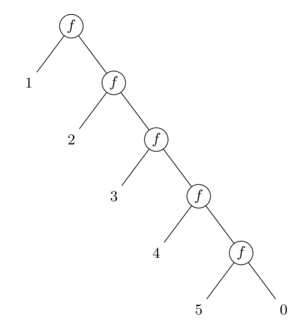
A left fold (reduce_left) works in the opposite direction. The seed value starts on the left and "travels" rightward, combining each element in sequence. This means the function is applied in the same order as the elements appear in the list.
reduce_left(f, 0, [1, 2, 3, 4, 5])reduce_left(f, 0, [1, 2, 3, 4, 5])
expands to...
f(f(f(f(f(0, 1), 2), 3), 4), 5)f(f(f(f(f(0, 1), 2), 3), 4), 5)
Visually, this can be seen as:
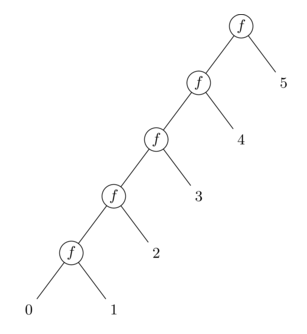
In a strict language like Coal, this difference matters for operations that are not associative. For example, subtracting the elements:
reduce(fn(x, acc) => x - acc, 0, [1, 2, 3])      // 1 - (2 - (3 - 0)) = 1 - 2 - 3 = -4
reduce_left(fn(acc, x) => acc - x, 0, [1, 2, 3]) // ((0 - 1) - 2) - 3 = -6reduce(fn(x, acc) => x - acc, 0, [1, 2, 3])      // 1 - (2 - (3 - 0)) = 1 - 2 - 3 = -4
reduce_left(fn(acc, x) => acc - x, 0, [1, 2, 3]) // ((0 - 1) - 2) - 3 = -6
For associative operations like addition, both produce the same result.
List predicates
A predicate is a function that tests for some condition with respect to its argument and returns true or false. By convention, functions that serve this purpose are often prefixed with is_. The below predicates are available in the standard List package:
is_empty     : List<a> -> bool
is_nonempty  : List<a> -> bool
is_singleton : List<a> -> boolis_empty     : List<a> -> bool
is_nonempty  : List<a> -> bool
is_singleton : List<a> -> bool
is_empty
A common operation on lists is to check if a list is empty or not. This is what the function is_empty does.
is_empty([])                                   // true
is_empty(["wheat", "oats", "rye", "barley"])   // falseis_empty([])                                   // true
is_empty(["wheat", "oats", "rye", "barley"])   // false
is_nonempty
This function is the opposite of is_empty. That is:
is_nonempty(xs) <==> ! is_empty(xs)
is_singleton
This function returns true when the input list has precisely one element.
is_singleton(["oats"])                             // true
is_singleton([])                                   // false
is_singleton(["wheat", "oats", "rye", "barley"])   // falseis_singleton(["oats"])                             // true
is_singleton([])                                   // false
is_singleton(["wheat", "oats", "rye", "barley"])   // false
Option
The Option type is a built-in algebraic data type that represents optional values — values that may or may not be present. This type is called Maybe in Haskell and is similar to Option in languages like Rust or Scala.
type Option<a>
  = Some(a)
  | Nonetype Option<a>
  = Some(a)
  | None
Since match statements in Coal need to be exhaustive, Option is useful to express the fact that a value cannot be produced in certain cases. For example, let’s say that we are trying to define a function head, returning the first element of a list:
fun head(list : List<a>) : a =
  match(list) {
    | head :: _ => head
    | [] => // 💥 What should I return here?
  }fun head(list : List<a>) : a =
  match(list) {
    | head :: _ => head
    | [] => // 💥 What should I return here?
  }
The type of this function would be:
head : List<a> -> ahead : List<a> -> a
We can read this type as: Given any type a and a list of elements of this type, return an a value. That is to say; we know nothing about a, except that the list’s elements has this type.
Therefore, if the input list is empty, then we have nothing to look at. Option solves this problem. The head function provided by the standard List package is defined in the following way:
fun head(list : List<a>) : Option<a> =
  match(list) {
    | head :: _ => Some(head)
    | [] => None
  }fun head(list : List<a>) : Option<a> =
  match(list) {
    | head :: _ => Some(head)
    | [] => None
  }
Result
The Result type represents computations that may either succeed or fail. It is similar to Either in Haskell:
type Result<r, e>
  = Ok(r)
  | Err(e)type Result<r, e>
  = Ok(r)
  | Err(e)
A value of type Result<r, e> is one of:
Ok(r), indicating a successful outcome carrying a result value of typer, orErr(e), indicating a failure carrying an error value of typee.
Example
This example shows how Result is used in the return type of read_file from
the IO-package to handle errors when reading a file from the file system.
module Main {

  import IO(println_string, read_file, FileIOError)
  import Coal.Monad(and_then)

  fun show_error(error : FileIOError) =
    match(error) {
      | FileNotFound =>
          println_string("File not found")
      | _ =>
          println_string("Unspecified error")
    }

  fun main() =
    read_file("does_not_exist.txt")
      |. and_then(fn(result) =>
           match(result) {
             | Ok(file) => println_string(file)
             | Err(err) => show_error(err)
           })

}module Main {

  import IO(println_string, read_file, FileIOError)
  import Coal.Monad(and_then)

  fun show_error(error : FileIOError) =
    match(error) {
      | FileNotFound =>
          println_string("File not found")
      | _ =>
          println_string("Unspecified error")
    }

  fun main() =
    read_file("does_not_exist.txt")
      |. and_then(fn(result) =>
           match(result) {
             | Ok(file) => println_string(file)
             | Err(err) => show_error(err)
           })

}
The type of read_file is:
read_file : string -> IO<Result<string, FileIOError>>read_file : string -> IO<Result<string, FileIOError>>
Tuples
Just like lists, tuples are ordered sequences of values. Unlike lists, however, a tuple’s length is fixed (i.e. determined at compile-time), and its elements can have different types. In code, a tuple is written as a comma-separated sequence of expressions enclosed in parentheses:
(%expr_1, %expr_2, ..., %expr_n)
  ( %expr_1 : %type_1
  , %expr_2 : %type_2
  , ...
  , %expr_n : %type_n
  ) :
  ( %type_1
  , %type_2
  , ...
  , %type_n
  )
For example:
(10, "covfefe", false) // The type of this tuple is: (int32, string, bool)(10, "covfefe", false) // The type of this tuple is: (int32, string, bool)
Tuples of length two and three are often called pairs and triples, respectively. There is no singleton tuple type — a single value in parentheses is just the value itself:
(42) // Not a tuple -- just the integer 42(42) // Not a tuple -- just the integer 42
The empty tuple does exist, and has special meaning. It is written () and is known as the unit value. The type of () is unit. (See Built-in language primitives for more on this type.)
()            : unit                           // unit value
(1, 2)        : (int32, int32)                 // 2-tuple
(1, 2, 3)     : (int32, int32, int32)          // 3-tuple
(1, 2, 3, 4)  : (int32, int32, int32, int32)   // 4-tuple
// ...()            : unit                           // unit value
(1, 2)        : (int32, int32)                 // 2-tuple
(1, 2, 3)     : (int32, int32, int32)          // 3-tuple
(1, 2, 3, 4)  : (int32, int32, int32, int32)   // 4-tuple
// ...
The maximum number of elements a tuple can have is 16.
As with other data types, tuples can be deconstructed through pattern matching:
fun fst3((fst, _, _) : (a, b, c)) : a = fst fun snd3((_, snd, _) : (a, b, c)) : b = snd fun thd3((_, _, thd) : (a, b, c)) : c = thdfun fst3((fst, _, _) : (a, b, c)) : a = fst fun snd3((_, snd, _) : (a, b, c)) : b = snd fun thd3((_, _, thd) : (a, b, c)) : c = thd
Tuples and currying
To specify a tuple as the only argument to a function, you need to use an extra pair of parentheses:
fun add((a, b)) = a + b

let five = add((1, 4))fun add((a, b)) = a + b

let five = add((1, 4))
The curry and uncurry combinators convert an uncurried function into a curried one, and vice versa.
curry   : ((a, b) -> c) -> a -> b -> c
uncurry : (a -> b -> c) -> (a, b) -> ccurry   : ((a, b) -> c) -> a -> b -> c
uncurry : (a -> b -> c) -> (a, b) -> c
To import these, add the following import statement:
import Coal.Combinators(curry, uncurry)import Coal.Combinators(curry, uncurry)
Here is how curry is used with the uncurried version of add, to change it into curried form.
let five = curry(add, 1, 4) // or (curry(add))(1, 4)let five = curry(add, 1, 4) // or (curry(add))(1, 4)
Records
Records are unordered collections of name–value pairs, where the values can be of any type, including other records. In Coal, records are first-class values. They are suitable for representing structured data with multiple properties, or nested objects. A record expression is written as a sequence of comma-separated fields enclosed in curly braces. Each field consists of a name, called the label, paired with a value. The two are separated by an equals sign (=):
{
  name = "Robert Sixkiller",
  shoe_size = 43.0f,
  privileges = ["read", "edit", "karaoke"]
}{
  name = "Robert Sixkiller",
  shoe_size = 43.0f,
  privileges = ["read", "edit", "karaoke"]
}
The corresponding type for the above record is:
{ name : string, shoe_size : float, privileges : List<string> }{ name : string, shoe_size : float, privileges : List<string> }
The type of a record resembles the expression itself, except that each field is written as a label followed by its type. Instead of an equals sign, a colon (:) separates the label and the type.
Since the order of fields is irrelevant, the following two records are considered identical:
{ x = 1, y = 2 }
{ y = 2, x = 1 }{ x = 1, y = 2 }
{ y = 2, x = 1 }
The naming rules for labels are the same as for variables: labels must consist of alphanumeric characters or underscores (_), and the first character cannot be a digit.
Field access
The contents of a record field can be obtained using the field-access operator, which is simply a dot (.) followed by the field’s label:
let language = { name = "Java", paradigm = "OOP" }
  in language.namelet language = { name = "Java", paradigm = "OOP" }
  in language.name
Extending records
Records in Coal are extensible, meaning that new fields can be added to a record at run time. For example:
fun tagged(rec, t : string) = { tag = t | rec }fun tagged(rec, t : string) = { tag = t | rec }
This function accepts two arguments: an existing record rec and a string t. It returns a copy of rec augmented with a new field tag which assumes the value of t. The pipe symbol (|) is an infix operator that takes the record on the right-hand side and extends it with the fields on the left.
For example, if we define a record r = { day = "monday", humidity = 73.5 } and apply tagged(r, "wet"), we obtain a new record:
{ day = "monday", humidity = 73.5, tag = "wet" }{ day = "monday", humidity = 73.5, tag = "wet" }
What makes this especially useful is that the type of the original record does not matter; its labels and field types need not be known at compile time.
The left-hand side of the pipe is itself a list of fields, so any number of fields can be added at once:
{ a = 1, b = 2 | { c = 3 } } == { a = 1 | { b = 2 | { c = 3 } } } == { a = 1 | { b = 2, c = 3 } } => { a = 1, b = 2, c = 3 }{ a = 1, b = 2 | { c = 3 } } == { a = 1 | { b = 2 | { c = 3 } } } == { a = 1 | { b = 2, c = 3 } } => { a = 1, b = 2, c = 3 }
Open and closed records
Here is the function signature for tagged again, this time with added type annotations:
tagged(rec : { | r }, t : string) : { tag : string | r } =
  { tag = t | rec }tagged(rec : { | r }, t : string) : { tag : string | r } =
  { tag = t | rec }
These types look a bit different from earlier examples. Here, the pipe (|) also appears at the type level. It serves a similar purpose: combining fields with an existing record type. The type variable r represents a row, which can be thought of as a type-level list of fields. A record type of this form is called open. By contrast, a closed record type explicitly lists all its fields. The following example illustrates the difference. Suppose we want to represent GPS coordinates with two fields, lat and lng:
fn(p : { lat : float, lng : float }) => p.latfn(p : { lat : float, lng : float }) => p.lat
In this example, the function requires its argument p (a record) to have exactly two fields: lat and lng, both of type float. This type is closed.
fn(p : { lat : float, lng : float | q }) => p.latfn(p : { lat : float, lng : float | q }) => p.lat
This function, on the other hand, is polymorphic in the row variable q. It accepts any record that includes lat and lng (both floats), regardless of any additional fields.
For instance, all of the following are valid:
{ lat = -3.067425, lng = 37.355625, alt = 5895 },{ location = "Great Pyramid", time = "2024-09-15T10:57:19Z", lat = 29.9792, lng = 31.1342 }, and{ lat = 0.0, lng = 1.0 },
This type is open. The general format of an open record type is
{ %label_1 : %type_1, %label_2 : %type_2, ..., %label_n : %type_n | %r },
for some n ≥ 0.
The variable %r on the right-hand side of the pipe represents a row variable that captures all remaining fields of the record — those not explicitly listed on the left-hand side. Unlike the field patterns on the left, %r is a simple variable name, not a pattern. It serves as a placeholder for "whatever other fields this record might have," making the type polymorphic over those additional fields.
Recall the earlier tagged example and the type of the argument rec in that function:
rec : { | r }rec : { | r }
In this type, the variable r captures all fields of the input record, so n is zero. This explains the somewhat unusual-looking type { | r }.
Pattern matching over records
As with other data types, it is possible to pattern match on records. In this context, the right-hand side of a field acts as the binding pattern used to match the sub-expression. The simplest case is to bind a field directly to a variable:
fun full_name({ first_name = fn, last_name = ln }) = fn +++ " " +++ lnfun full_name({ first_name = fn, last_name = ln }) = fn +++ " " +++ ln
Shorthand syntax
When the variable name you want to bind to is the same as the field label, you can use a shorthand notation to omit the explicit binding. Instead of writing { field = field }, you can simply write { field }. This is purely syntactic sugar and behaves in the exact same way.
fun full_name({ first_name, last_name }) = first_name +++ " " +++ last_namefun full_name({ first_name, last_name }) = first_name +++ " " +++ last_name
Deconstructing records
The pipe (|) operator allows you to deconstruct records by matching against a subset of their fields:
fun get_name({ name = n | _ }) = nfun get_name({ name = n | _ }) = n
The right-hand side pattern must be either a variable or a wildcard (_). If you use a variable here, it will capture the remainder of the record (all fields not explicitly matched). A common use case is to remove one or more fields from a record. For example:
fun drop_name({ name = _ | fields } : { name : string | q }) : { | q } = fieldsfun drop_name({ name = _ | fields } : { name : string | q }) : { | q } = fields
Here, the name field is removed and a record with all remaining fields are returned.
Keep in mind that if you only need to retrieve a single field, the dot syntax (record.field) is simpler and more concise. Pattern matching really becomes necessary when you want to extract multiple fields at once, remove fields, or work with the remainder of a record.
Updating a field
By combining field extension with pattern matching, you can replace an existing field in a record. For instance, here is a function that updates the tag field:
fun set_tag({ tag = _ | fields }, new_tag : string) = { tag = new_tag | fields }fun set_tag({ tag = _ | fields }, new_tag : string) = { tag = new_tag | fields }
This proceeds in two steps: first remove the old field using pattern matching, then reinsert it with the new value. With type annotations:
fun set_tag(
  { tag = _ | fields } : { tag : string | r },
  new_tag : string
) : { tag : string | r } =
  { tag = new_tag | fields }fun set_tag(
  { tag = _ | fields } : { tag : string | r },
  new_tag : string
) : { tag : string | r } =
  { tag = new_tag | fields }
This function requires not only that the tag field is present, but also that it has the expected type. For example, { tag = false } would be rejected, since tag is required to have type string.
Modules
Projects in Coal are organized as collections of modules. Modules make it possible to group related functionality into distinct namespaces. A module contains functions, type definitions and other language constructs, typically focused on a specific purpose within a library or application.
module %path(%export_list) {
  %import_statement
  %import_statement
  ...
  %definition
  %definition
  ...
}
A definition can be a function, let-binding, data type definition, type alias, trait, or trait instance. Traits and trait instances are introduced here. The rest of these are explained in more detail under Top-level definitions.
Every module is uniquely identified by its path.
- The path mirrors the directory structure of the source file in which the module is located.
- Path segments begin with an uppercase letter and are separated by a dot (
.). - Files have a
.coalextension.
A module Utils.Math.Trigonometry, for instance, is defined in a file named Trigonometry.coal, located under Utils/Math/ relative to your project’s root directory:
src
└── Utils
    └── Math
        └── Trigonometry.coal
Top-level definitions
Definitions that occupy the outermost scope of a module are functions, top-level let-expressions, data type definitions, traits, trait instances, and folds.
Functions
A function is defined with the fun keyword, followed by the function’s name and a list of comma-separated arguments enclosed in parentheses. The function body is simply an expression, which comes after the arguments and is preceded by an equals sign:
fun %name(%arg_1, %arg_2, ..., %arg_n) = %expr
A type annotion can be given to indicate a function’s return type, as in the following example:
fun is_even(n : int32) : bool =
  n % 2 == 0fun is_even(n : int32) : bool =
  n % 2 == 0
Function parameters are patterns, allowing functions to directly deconstruct their arguments. In addition to basic variables, records, tuples, and other data constructors, patterns can also include wildcards, literals, and nested structures.
fun grok({ n : int32 }, (fst, snd), _) =
  ...fun grok({ n : int32 }, (fst, snd), _) =
  ...
Top-level functions can also be defined in the form of a list of pattern-expression pairs, separated by a |-symbol. For example:
fun unpack
  | [a], true    => a
  | [a, _], true => a
  | [a, _, _], _ => a
  | _, _         => 0fun unpack
  | [a], true    => a
  | [a, _], true => a
  | [a, _, _], _ => a
  | _, _         => 0
This style of top-level function is equivalent to defining the function with an explicit match expression inside its body:
fun unpack(a1, a2) =
  match((a1, a2)) {
    | ([a], true)    => a
    | ([a, _], true) => a
    | ([a, _, _], _) => a
    | (_, _)         => 0
  }fun unpack(a1, a2) =
  match((a1, a2)) {
    | ([a], true)    => a
    | ([a, _], true) => a
    | ([a, _, _], _) => a
    | (_, _)         => 0
  }
Here is another example from the Option module:
fun with_default
  | _, Some(value) => value
  | value, _       => valuefun with_default
  | _, Some(value) => value
  | value, _       => value
This function is used to extract a value of type a from an Option<a> by providing a default value for the case when the input is None. For example:
let name = Option.with_default("Anonymous", user.name)let name = Option.with_default("Anonymous", user.name)
or
let name = user.name |. with_default("Anonymous")let name = user.name |. with_default("Anonymous")
See Pattern matching for a more detailed discussion of patterns and the match syntax.
Main
Just like in many other programming languages, the main function serves as the entry point of a program:
module Main {

  fun main() =
    ...module Main {

  fun main() =
    ...
The type of main is unit -> IO<unit>. See IO for an explanation of the IO type.
Let-expressions
The let keyword introduces a new name bound to the result of an expression. Inside functions, a let is often used to give names to intermediate values:
fun hypotenuse(a, b) =
  let sqr_a = a * a;
      sqr_b = b * b
  in
    sqrt(sqr_a + sqr_b)fun hypotenuse(a, b) =
  let sqr_a = a * a;
      sqr_b = b * b
  in
    sqrt(sqr_a + sqr_b)
Here, sqr_a and sqr_b are local bindings, only visible in the body that follows the in.
At the top level of a module, a let works in the same way, except there is no enclosing body — the binding simply introduces a global name that can be referenced elsewhere in the module (or from other modules):
let days =
  [ "Monday"
  , "Tuesday"
  , "Wednesday"
  , "Thursday"
  , "Friday"
  , "Saturday"
  , "Sunday"
  ]let days =
  [ "Monday"
  , "Tuesday"
  , "Wednesday"
  , "Thursday"
  , "Friday"
  , "Saturday"
  , "Sunday"
  ]
Type annotations for let-bindings look similar to those for functions:
let days : List<string> =
  [ "Monday", "Tuesday", "Wednesday", "Thursday", "Friday", "Saturday", "Sunday" ]let days : List<string> =
  [ "Monday", "Tuesday", "Wednesday", "Thursday", "Friday", "Saturday", "Sunday" ]
Since a let can hold any expression, top-level functions can also be defined this way:
let add = fn(x, y) => x + y
// Equivalent to:
// fun add(x, y) = x + ylet add = fn(x, y) => x + y
// Equivalent to:
// fun add(x, y) = x + y
Note that, unlike at the expression level, it isn't possible to bind to a pattern in a top-level let-binding.
let (a, b) = (1, 3) // This only works inside expressionslet (a, b) = (1, 3) // This only works inside expressions
Data types
User-defined data types in Coal are introduced using the type keyword. They are of the product-sum variety.
A product type combines multiple fields into one single value: All of the components appear together in the constructed data. An RGB color triplet that contains individual red, green, and blue values can be described with a type:
type Color = Rgb(int8, int8, int8)type Color = Rgb(int8, int8, int8)
A sum type is a choice between alternatives: A value belongs to exactly one of the specified variants. A type that represents a shape that can be either a Circle or a Rectangle can be defined as:
type Shape = Circle | Rectangletype Shape = Circle | Rectangle
More complex types can be built by combining product and sum constructors. The following is a type that defines a binary tree, parameterized by the type (a) of its nodes:
type Tree<a>
  = Leaf
  | Node(a, Tree<a>, Tree<a>)type Tree<a>
  = Leaf
  | Node(a, Tree<a>, Tree<a>)
This definition says that a Tree<a> is either:
- a
Leaf(the empty tree), or - a
Nodecontaining a value of typeaalong with two sub-trees (the left and right branches).
Using this type, we can represent any finite binary tree. For example, here is a tree of integers:
//          (4)
//          / \
//       ---------
//       /       \
//     (2)       (6)
//    -----     -----
//    /   \     /   \
//  (1)   (3) (5)   (7)

let tree_of_gondor =
  Node
    ( 4
    , Node
        ( 2
        , Node(1, Leaf, Leaf)
        , Node(3, Leaf, Leaf)
        )
    , Node
        ( 6
        , Node(5, Leaf, Leaf)
        , Node(7, Leaf, Leaf)
        )
    )//          (4)
//          / \
//       ---------
//       /       \
//     (2)       (6)
//    -----     -----
//    /   \     /   \
//  (1)   (3) (5)   (7)

let tree_of_gondor =
  Node
    ( 4
    , Node
        ( 2
        , Node(1, Leaf, Leaf)
        , Node(3, Leaf, Leaf)
        )
    , Node
        ( 6
        , Node(5, Leaf, Leaf)
        , Node(7, Leaf, Leaf)
        )
    )
The structure of the tree is entirely determined by its constructors (Leaf and Node), which makes recursion natural.
Algebraic data types are especially useful for describing language grammars and other hierarchical structures. Consider this JSON representation:
type JsonValue
  = Null
  | Bool(bool)
  | Number(double)
  | String(string)
  | Array(List<JsonValue>)
  | Object(List<(string, JsonValue)>)type JsonValue
  = Null
  | Bool(bool)
  | Number(double)
  | String(string)
  | Array(List<JsonValue>)
  | Object(List<(string, JsonValue)>)
Type aliases
A type alias assigns a name to an existing type, making complex definitions easier to express and reuse. It can refer to primitive types, records, function types, or algebraic data types.
type alias %Name<%param_1, ..., %param_n> = %type
For example:
type alias User = { username : string, email : string, permissions: List<Permission> }type alias User = { username : string, email : string, permissions: List<Permission> }
An alias can include type parameters. For example, given a type Map<key, val>, we can define:
type alias Dictionary<val> = Map<string, val>type alias Dictionary<val> = Map<string, val>
Imports
An import statement is used to bring in functions and other definitions from a module in your project. These statements must appear at the beginning of the module, before any definitions. The following line makes some functions from the List module available to the current module:
import List(concat, head, tail)import List(concat, head, tail)
Note that only definitions that are exported by the source module can be imported. See Exports.
Type imports
Importing a type follows the same pattern. After the name of the type is an optional list of data constructors enclosed in parentheses. For example, let’s say our project includes a module Utilities, and that this module defines the following type:
type Answer = Yes | Notype Answer = Yes | No
To import this type and its constructors, we use the following statement:
import Utilities(Answer(Yes, No))import Utilities(Answer(Yes, No))
If the list of constructors is omitted, all public data constructors of the type are imported:
import Utilities(Answer) // Brings in Answer and its constructorsimport Utilities(Answer) // Brings in Answer and its constructors
Built-in types are always in scope
You may have noticed that some examples use the List type without an explicit import. List and other built-in types are available in every module by default.
These types include Option, Ordering, and the different primitive types, such as int32, string, and bool.
Trait imports
Traits are imported in the same way.
import Utilities(Countable)import Utilities(Countable)
Alternatively, you can import the individual methods of a trait directly. For example, if Countable is defined as:
trait Countable<a> {
  count :: a -> nat
}trait Countable<a> {
  count :: a -> nat
}
Then count can be imported like any regular function:
import Utilities(count)import Utilities(count)
Qualified imports
The special namespace keyword allows you to import and access all functions, types, and other definitions from a module via their qualified names. A qualified name is formed by prefixing the name with the path of the module followed by a dot (.):
// Import the List module under its namespace
import namespace List

  // And use it like this:
  let zs = List.concat(xs, ys)// Import the List module under its namespace
import namespace List

  // And use it like this:
  let zs = List.concat(xs, ys)
Exports
In a module declaration, the path identifier is followed by an optional list of exported names enclosed in parentheses. Only exported names are visible outside the module (or public in OOP terminology).
module Utils.Math.Trigonometry(sin, cos, tan) {
  // ...module Utils.Math.Trigonometry(sin, cos, tan) {
  // ...
If this list is left out, everything in the module is exported.
Pattern matching
The match expression in Coal is used to deconstruct data based on its shape, effectively reversing what the data constructors of algebraic data types do. Pattern matching allows you to branch on the structure of a value and directly bind its components to variables. For example:
type Shape = Rectangle(float, float) | Circle(float)

fun area(shape) : float =
  match(shape) {
    | Rectangle(w, h) => w * h
    | Circle(r)       => pi * r^2
  }type Shape = Rectangle(float, float) | Circle(float)

fun area(shape) : float =
  match(shape) {
    | Rectangle(w, h) => w * h
    | Circle(r)       => pi * r^2
  }
A case in a match expression is called a clause and consists of a pattern on the left and an expression on the right. Pattern matching proceeds by checking each clause in order until it finds one whose pattern matches the value. The corresponding right-hand side expression is then evaluated, with any variables in the pattern bound to the matched sub-components.
match(list : List<int32>) {
  | [a]       => a
  | [a, _]    => a
  | [a, _, _] => a
  | _         => 0
}match(list : List<int32>) {
  | [a]       => a
  | [a, _]    => a
  | [a, _, _] => a
  | _         => 0
}
Variables introduced by a pattern are only in scope in the corresponding right-hand side expression:
match(opt) {
  | Some(x) => x + 1  // x is bound here
  | None    => 0      // x is not in scope here
}match(opt) {
  | Some(x) => x + 1  // x is bound here
  | None    => 0      // x is not in scope here
}
Patterns can take several forms, including data constructors, literals, tuples, records, variables, wildcards, or combinations of these:
match(shape) {
  | Rectangle(0.0, _) => "flat rectangle"
  | Rectangle(w, h)   => "rectangle with width " +++ show(w)
}match(shape) {
  | Rectangle(0.0, _) => "flat rectangle"
  | Rectangle(w, h)   => "rectangle with width " +++ show(w)
}
See below for a complete list of available patterns.
Totality requirement
For a function to be total, it must be defined for all inputs of its corresponding type. In Coal, functions are always total. A consequence of this in the context of match expressions is that all possible cases for a type need to be covered by the patterns. In other words, the patterns must be exhaustive. If a case is missing, the compiler will reject the program.
For example, the following function
fun head(input) =
  match(input) {
    | x :: xs => x
  }fun head(input) =
  match(input) {
    | x :: xs => x
  }
will produce an error:
4:5:
  |
  |     match(input) {
  |     ^^^^^^^^^^^^^^
  |       | x :: xs => x
  | ^^^^^^^^^^^^^^^^^^^^
  |     }

Non-exhaustive patterns
Wildcard patterns
A wildcard pattern is a pattern that matches any value without binding it to a name and is written as an underscore (_). These are often useful to guarantee exhaustiveness in match expressions. For instance, we can use literal patterns along with a wildcard when matching on integers:
fun describe_int(n : int32) : string =
  match(n) {
    | 0 => "zero"
    | 1 => "one"
    | _ => "something else"
  }fun describe_int(n : int32) : string =
  match(n) {
    | 0 => "zero"
    | 1 => "one"
    | _ => "something else"
  }
Guards
Guards add conditional logic to patterns, allowing you to refine a match based on boolean conditions. Instead of using nested if-then-else expressions within a match clause, guards provide a cleaner syntax with the when and otherwise keywords.
The first example below shows the traditional approach using if-then-else:
match(parse_int32(s)) {
  | Some(n) =>
      if (n == rand)
        then println_string("You guessed right!")
      else if (n > rand)
        then println_string("Too large!")
      else
        println_string("Too small!")
  | None =>
      println_string("Not a number")
}match(parse_int32(s)) {
  | Some(n) =>
      if (n == rand)
        then println_string("You guessed right!")
      else if (n > rand)
        then println_string("Too large!")
      else
        println_string("Too small!")
  | None =>
      println_string("Not a number")
}
With guards, the same logic becomes more declarative:
match(parse_int32(s)) {
  | Some(n)
      when (n == rand) =>
        println_string("You guessed right!")
      when (n > rand) =>
        println_string("Too large!")
      otherwise =>
        println_string("Too small!")
  | _ =>
      println_string("Not a number")
}match(parse_int32(s)) {
  | Some(n)
      when (n == rand) =>
        println_string("You guessed right!")
      when (n > rand) =>
        println_string("Too large!")
      otherwise =>
        println_string("Too small!")
  | _ =>
      println_string("Not a number")
}
Each when clause tests a condition in order. If none of the when conditions match, the otherwise clause serves as a fallback for that pattern. Guards are evaluated sequentially, and the first matching guard's expression is executed.
Fallthrough semantics
An important difference between guards and if-then-else expressions is that guards can fail and allow the match to continue to the next clause. Unlike if-then-else, which requires both a then and else branch, a when guard without a matching condition will fall through to the next pattern in the match expression. For example:
match(opt) {
  | Some(n) when (n > 0) => "positive"
  | _ => "no value, zero, or negative"
}match(opt) {
  | Some(n) when (n > 0) => "positive"
  | _ => "no value, zero, or negative"
}
Here, if opt is Some(n) but n is not greater than zero, the first clause's guard fails and matching continues with the wildcard clause. The same wildcard also handles None. This allows values with different patterns to share a fallback clause without duplicating its result or handling every case within the first Some branch.
Supported patterns
| Type | Example | Description |
|---|---|---|
| Constructor | Color(r, g, b) |
Matches a value built with a specific data constructor, binding sub-components to variables. |
| Variable | x |
Matches any value and binds it to the variable. |
| Wildcard | _ |
Ignores the matched value (see above). |
| Literal | "Hello", 0, () |
Matches values that are exactly equal to the given literal. |
| List constructor | x :: xs |
Matches a list by separating it into head and tail. |
| List literal | [f, s, t] |
Matches a list of fixed length with elements matching the given sub-patterns. |
| Tuple | (lhs, rhs) |
Matches a tuple by decomposing it into its components. |
| Record | { name = n | _ } |
Matches a record by specifying patterns for one or more fields. See Pattern matching over records for details. |
| As | (lhs, _) as pair |
Matches the inner pattern, while also binding the entire value to a variable. |
| @ | Succ(@n) |
Fold recursion. See Recursion and corecursion. |
| Or | 1 or 2 |
Matches if the value satisfies at least one of the given alternative patterns. |
Lambda match
A lambda match is a special syntax that lets you hide the variable in a match expression. For example, this expression:
match {
  | [] => true
  | _ => false
}match {
  | [] => true
  | _ => false
}
is a shorthand version of this:
fn(val) =>
  match(val) {
    | [] => true
    | _ => false
  }fn(val) =>
  match(val) {
    | [] => true
    | _ => false
  }
Traits
A trait describes a collection of functions that must be defined for a given type.
trait %Name(%type_parameter) {
  %definition_1 : %type_1
  %definition_2 : %type_2
  ...
  %definition_n : %type_n
}
By defining a set of behaviors as a trait, you can reuse the same functionality across all types that support it. This reduces duplication and encourages reusable code. Traits are conceptually similar to type classes in Haskell and a common analogy is to think of them as interfaces in object-oriented programming.
The following example defines a trait with a single function, compare. This function takes two inputs a and b of the same type and returns a value to indicate if a is less than b (Lt), greater than (Gt), or if the two values are equal (Eq).
trait Ordered<t> {
  fun compare : t -> t -> Order   // where type Order = Lt | Gt | Eq
}trait Ordered<t> {
  fun compare : t -> t -> Order   // where type Order = Lt | Gt | Eq
}
Making a type support a trait comes down to defining an instance of the trait. An instance provides concrete implementations of all functions declared in the trait, specialized for the chosen type. For example, by instantiating the Ordered trait for bool, we define an ordering on the booleans:
instance Ordered<bool> {
  fun compare(a, b) =
    match((a, b)) {
      | (false, true) => Lt
      | (true, false) => Gt
      | (_, _) => Eq
    }
}instance Ordered<bool> {
  fun compare(a, b) =
    match((a, b)) {
      | (false, true) => Lt
      | (true, false) => Gt
      | (_, _) => Eq
    }
}
Code that uses compare now works uniformly for all types that have an Ordered instance:
fun is_less_than(x : t, y : t) : bool with (Ordered<t>) =
  compare(x, y) == Lt

// is_less_than(3, 5)
// is_less_than(false, true)fun is_less_than(x : t, y : t) : bool with (Ordered<t>) =
  compare(x, y) == Lt

// is_less_than(3, 5)
// is_less_than(false, true)
Type parameters, like t in the type of is_less_than are universally quantified. The with keyword introduces one or more constraints on type variables appearing in a type. In this case it demands that an instance of Ordered exists for the type substituted for t.
We write the full type of is_less_than as: t -> t -> bool with (Ordered<t>).
Built-in traits
Coal includes several built-in traits that enable operator overloading and provide common functionality across different types. Operator overloading means that the same operator symbol (such as + or ==) can work with multiple types — for example, allowing + to add both integers and floating-point numbers. By implementing these traits for a type, you define how standard operators behave for that type.
Numeric
The Numeric trait describes types that support basic arithmetic, like addition and multiplication. All built-in numeric types (int32, int64, bignum, float, double, and nat) have Numeric instances.
The following examples shows how to define a Numeric instance for bool.
import Number(is_even)

instance Numeric<bool> {
  fun from_int32(n : int32) = is_even(n)
  fun from_int64(n : int64) = is_even(n)
  fun from_bignum(n : bignum) = is_even(n)
  fun negate
    | false        => true
    | _            => false
  fun `+`
    | false, false => false // 0 + 0 = 0
    | false, true  => true  // 0 + 1 = 1
    | true, false  => true  // 1 + 0 = 1
    | true, true   => false // 1 + 1 = 0
  fun `-`
    | false, false => true  // 0 - 0 = 0 + (-0) = 0 + 1 = 1
    | false, true  => false // 0 - 1 = 0 + (-1) = 0 + 0 = 0
    | true, false  => false // 1 - 0 = 1 + (-0) = 1 + 1 = 0
    | true, true   => true  // 1 - 1 = 1 + (-1) = 1 + 0 = 1
  fun `*`
    | true, true   => true  // 1 * 1 = 1
    | _, _         => false // otherwise 0
}import Number(is_even)

instance Numeric<bool> {
  fun from_int32(n : int32) = is_even(n)
  fun from_int64(n : int64) = is_even(n)
  fun from_bignum(n : bignum) = is_even(n)
  fun negate
    | false        => true
    | _            => false
  fun `+`
    | false, false => false // 0 + 0 = 0
    | false, true  => true  // 0 + 1 = 1
    | true, false  => true  // 1 + 0 = 1
    | true, true   => false // 1 + 1 = 0
  fun `-`
    | false, false => true  // 0 - 0 = 0 + (-0) = 0 + 1 = 1
    | false, true  => false // 0 - 1 = 0 + (-1) = 0 + 0 = 0
    | true, false  => false // 1 - 0 = 1 + (-0) = 1 + 1 = 0
    | true, true   => true  // 1 - 1 = 1 + (-1) = 1 + 0 = 1
  fun `*`
    | true, true   => true  // 1 * 1 = 1
    | _, _         => false // otherwise 0
}
Here is how this instance can be used:
let result = false + true * true // truelet result = false + true * true // true
As another example, we can define a type Complex to represent complex numbers:
type Complex = Complex(double, double)type Complex = Complex(double, double)
The Numeric instance for this type could then be implemented as:
instance Numeric<Complex> {
  fun from_int32(n : int32) =
    Complex(int32_to_double(n), 0)
  fun from_int64(n : int64) =
    Complex(int64_to_double(n), 0)
  fun from_bignum(n : bignum) =
    Complex(bignum_to_double(n), 0)
  fun negate(Complex(r, i)) =
    Complex(-r, -i)
  fun `+`(Complex(r, i), Complex(q, j)) =
    Complex(r + q, i + j)
  fun `-`(Complex(r, i), Complex(q, j)) =
    Complex(r - q, i - j)
  fun `*`(Complex(r, i), Complex(q, j)) =
    Complex(r * q - i * j, r * j + i * q)
}instance Numeric<Complex> {
  fun from_int32(n : int32) =
    Complex(int32_to_double(n), 0)
  fun from_int64(n : int64) =
    Complex(int64_to_double(n), 0)
  fun from_bignum(n : bignum) =
    Complex(bignum_to_double(n), 0)
  fun negate(Complex(r, i)) =
    Complex(-r, -i)
  fun `+`(Complex(r, i), Complex(q, j)) =
    Complex(r + q, i + j)
  fun `-`(Complex(r, i), Complex(q, j)) =
    Complex(r - q, i - j)
  fun `*`(Complex(r, i), Complex(q, j)) =
    Complex(r * q - i * j, r * j + i * q)
}
Ordered
The Ordered trait captures the notion of a total order on its parameterized type (similar to Haskell’s Ord type class). This makes it possible to compare two values using the comparison (<, >, <=, and >=) operators.
For boolean values we can define an instance:
instance Ordered<bool> {
  fun compare
    | false, true  => LessThan
    | true, false  => GreaterThan
    | _, _         => EqualTo
}instance Ordered<bool> {
  fun compare
    | false, true  => LessThan
    | true, false  => GreaterThan
    | _, _         => EqualTo
}
Here is how this instance can be used:
let result = false < true // evaluates to truelet result = false < true // evaluates to true
Higher-kinded traits
So far, the traits we’ve looked at have all been of the form T<t>, where t is a placeholder for any ordinary type. Unlike these, a type constructor is a type-level function which takes one or more types as arguments and returns a type. That is, a type constructor on its own isn’t really a type, until it is provided with all necessary type arguments. For example, in the type Option<int32>, Option is a type constructor with kind * -> *, where * denotes a proper type (i.e., a fully applied type with no parameters). We can then read Option : * -> * as:
Option is a type constructor that takes a type as input and produces a type.
This generalizes to constructors of higher kinds. For example, Result<e, a> has kind * -> * -> *.
Traits can be parameterized by type constructors. Instead of T<t : *>, we then get a trait of the form T<f : * -> ... -> *>. A common example is the Functor trait, which abstracts the idea of mapping a function over some container-like structure:
trait Functor<f> {
  map : (a -> b) -> f<a> -> f<b>;
}trait Functor<f> {
  map : (a -> b) -> f<a> -> f<b>;
}
The Option type forms a Functor in the following way:
// Make Option an instance of the Functor trait
instance Functor<Option> {
  fun map(f, opt) =
    match(opt) {
      | Some(a) => Some(f(a))
      | None => None
    }
}// Make Option an instance of the Functor trait
instance Functor<Option> {
  fun map(f, opt) =
    match(opt) {
      | Some(a) => Some(f(a))
      | None => None
    }
}
This instance ensures that map can be used on Option values, just like on lists:
let times100 = fn(x) => x * 100

map(times100, Some(1))    // ==> Some(100)
map(times100, [1, 2, 3])  // ==> [100, 200, 300]let times100 = fn(x) => x * 100

map(times100, Some(1))    // ==> Some(100)
map(times100, [1, 2, 3])  // ==> [100, 200, 300]
Trait inheritance
A trait can declare that it depends on another trait by inheriting from it. The inheriting trait is then able to access to the methods of the parent trait, and build its own functionality on top of them. For example, the following instance defines how to display an Option<a> value, provided that there is already a way to display values of type a:
trait Show<Option<a>> with (Show<a>) { fun show(opt) = match(opt) { | Some(v) => "Some(" +++ show(v) +++ ")" | None => "None" } }trait Show<Option<a>> with (Show<a>) { fun show(opt) = match(opt) { | Some(v) => "Some(" +++ show(v) +++ ")" | None => "None" } }
Here, the Show<Option<a>> instance inherits from Show<a>. The compiler will only accept this instance assuming a Show implementation for a is available. Inside the trait body, we can call show(v) on the inner value v : a. The parent trait Show<a> guarantees that show is defined for this type. In other words, the ability to show an Option<a> depends directly on the ability to show its element type a.
Recursion and corecursion
In most programming languages, a typical implementation of the factorial function looks something like this:
fun factorial(n) =
  if (n == 0)
    then 1
    else n * factorial(n - 1)fun factorial(n) =
  if (n == 0)
    then 1
    else n * factorial(n - 1)
If we pass this function to the Coal compiler, then the program is rejected with the following error:
  |       else n * factorial(n - 1)
  | ^^^^^^^^^^^^^^^^^^^^^^^^^^^^^^^

• Explicit recursion detected: factorial
To call a function from itself in this way is not possible. Instead, recursion is accomplished through a pattern know as a fold.
Fold syntax
A fold (or catamorphism) is a way to deconstruct data, layer by layer. It abstracts the notion of a structurally recursive computation over some algebraic data type.
Although similar to how folds work in many other programming langues, note that
foldis a language keyword in Coal, and not an ordinary function. It is syntactically similar to amatchexpression (explained here), but with the crucial difference that afoldcarries built-in support for recursion.
To implement the factorial function using a fold, we are going to use the nat data type, which enumerates the natural numbers recursively:
Zero, Succ(Zero), Succ(Succ(Zero)), ...Zero, Succ(Zero), Succ(Succ(Zero)), ...
It is defined as:
type nat
  = Zero
  | Succ(nat)type nat
  = Zero
  | Succ(nat)
This type is recursive because nat appears inside one of its own constructors. We mark this recursive position with the special symbol @:
// Pseudo-code:

type nat
  = Zero
  | Succ(@)
This location is significant since it is precisely where the fold mechanism will recurse. Now in actual code, using the special @-pattern syntax (only available in fold expressions), we now express the factorial function as:
fun factorial(n : nat) =
  fold(n) {
    | Zero =>
        1
    | Succ(@p) as m =>
        m * p
  }fun factorial(n : nat) =
  fold(n) {
    | Zero =>
        1
    | Succ(@p) as m =>
        m * p
  }
Here is how to unpack the meaning of this:
- In the base case
Zero, the result is simply1. - In the recursive case
Succ(@p) as m:mis bound to the current value being matched (e.g.,Succ(Succ(Zero))),pis bound to the result of recursively folding over the inner value — the one inside the constructor (Succ).
So intuitively, @p behaves like “the result of recursively applying this same fold to the inner structure.” The compiler performs the recursion for you.
The end-result is the same as if you could have written an explicitly recursive definition such as:
| Succ(r) => Succ(r) * fold(r)
but without referring to the function by name.
As another example, the fibonacci function can be implemented in the following way:
fun fib(p : nat) =
  let (res, _) =
    fold(p - 1) {
      | Zero =>
          (1 : nat, 1)
      | Succ(@q) =>
          let
            (m, n) = q
          in
            (n, m + n)
    }
  in
    resfun fib(p : nat) =
  let (res, _) =
    fold(p - 1) {
      | Zero =>
          (1 : nat, 1)
      | Succ(@q) =>
          let
            (m, n) = q
          in
            (n, m + n)
    }
  in
    res
Well-foundedness
To ensure that recursion is well-founded (guaranteed to terminate), the use of @-patterns is restricted. Most importantly, they can only appear inside constructors. The reason for this is that a constructor’s fields are always structurally smaller than the value being folded. Progress toward the base case is thereby guaranteed in each step.
The following, for example, is therefore invalid:
fold(n) {
  | @p => p
}fold(n) {
  | @p => p
}
Here, @p appears at the top level, and not inside a constructor. This means that the fold would have no smaller sub-structure to recurse into.
Beyond the factorial
Folds can express a wide range of recursive computations over algebraic data types. For example, here is the implementation of reduce for lists:
fun reduce(f, acc, list) =
  fold(list, acc) {
    x :: @rec =>
      fn(a) => rec(f(x, a))
    [] =>
      fn(a) => a
  }fun reduce(f, acc, list) =
  fold(list, acc) {
    x :: @rec =>
      fn(a) => rec(f(x, a))
    [] =>
      fn(a) => a
  }
This definition captures the standard way of consuming a list by repeatedly applying a function (f) to its elements and an accumulator. The recursive descent through the list happens implicitly — the programmer specifies only what to do at each layer.
Note
Instead of dealing with recursive computations directly, it is often easier and safer to build on existing combinators and higher-order functions. For example, we can express the factorial function in the following way:
let factorial = product << enum_to // product of numbers 1, 2, ..., nlet factorial = product << enum_to // product of numbers 1, 2, ..., n
Here, enum_to generates the list [1, 2, ..., n], and product multiplies its elements.
Mutual recursion
Even though the fold expression syntax is applicable to a wide range of algorithms, there are cases where it falls short. Let’s take another look at the JSON data type devised earlier:
type JsonValue
  = Null
  | Bool(bool)
  | Number(double)
  | String(string)
  | Array(List<JsonValue>)
  | Object(List<(string, JsonValue)>)type JsonValue
  = Null
  | Bool(bool)
  | Number(double)
  | String(string)
  | Array(List<JsonValue>)
  | Object(List<(string, JsonValue)>)
This type is recursive, but it differs from a simple type like nat in an important way: JsonValue does not appear immediately under a constructor. Instead, it is wrapped inside other data structures (List in the Array constructor, or List<(string, JsonValue)> in the Object constructor).
Suppose we want to implement a function that encodes JSON values as strings — that is, a recursive function of type JsonValue -> string:
fun json_encode(json_value) : string =
  fold(json_value) {
    // ... other constructors are straightforward
    | Array(json_values) => ?
    | Object(key_value_pairs>) => ?
  }fun json_encode(json_value) : string =
  fold(json_value) {
    // ... other constructors are straightforward
    | Array(json_values) => ?
    | Object(key_value_pairs>) => ?
  }
We might try to handle the Array case by matching on the list constructor:
| Array(@head :: tail) => ?
The @head pattern works as expected: it binds head to the result of recursively folding over that element. However, the rest of the list (tail) cannot be processed using an @-pattern in the same way. Its type is List<JsonValue>, not JsonValue. Fold-patterns expect a value of the same type as the one being folded over.
For this situation, we need a different solution.
Top-level folds
A top-level fold, unlike the expression-level syntax, has a name, which makes it callable from other folds, and from ordinary functions. This allows us to define separate folds for the three different cases:
fold encode_json_value : JsonValue -> string fold encode_json_array : List<JsonValue> -> List<string> fold encode_json_object : List<(string, JsonValue)> -> List<string>fold encode_json_value : JsonValue -> string fold encode_json_array : List<JsonValue> -> List<string> fold encode_json_object : List<(string, JsonValue)> -> List<string>
From one fold, we can invoke another. But folding is only possible from within a pattern, using the following syntax:
| JsonArray(encode_json_array(@values)) => ...
The @-pattern works in the same way here as in expression-level folds, binding values to the result of recursively folding over the list.
The following is a complete implementation the JSON encoder using this approach. The +++ operator performs string concatenation:
module Json {

  import String(intercalate)

  type JsonValue
    = JsonNull
    | JsonBool(bool)
    | JsonNumber(double)
    | JsonString(string)
    | JsonArray(List<JsonValue>)
    | JsonObject(List<(string, JsonValue)>)

  fold encode_json_value : JsonValue -> string {
    | JsonNull =>
        "null"
    | JsonBool(false) =>
        "false"
    | JsonBool(true) =>
        "true"
    | JsonNumber(d) =>
        double_to_string(d)
    | JsonString(str) =>
        "\"" +++ str +++ "\""
    | JsonArray(encode_json_array(@values)) =>
        "[" +++ intercalate(",", values) +++ "]"
    | JsonObject(encode_json_object(@key_value_pairs)) =>
        "{" +++ intercalate(",", key_value_pairs) +++ "}"
  }

  fold encode_json_array : List<JsonValue> -> List<string> {
    | [] => []
    | encode_json_value(@value) :: encode_json_array(@values) =>
        value :: values
  }

  fold encode_json_object : List<(string, JsonValue)> -> List<string> {
    | [] => []
    | (key, encode_json_value(@value)) :: encode_json_object(@pairs) =>
        let label = "\"" +++ key +++ "\""
        in (label +++ ":" +++ value) :: pairs
  }

  fun encode_json(value : JsonValue) = encode_json_value(value)

}module Json {

  import String(intercalate)

  type JsonValue
    = JsonNull
    | JsonBool(bool)
    | JsonNumber(double)
    | JsonString(string)
    | JsonArray(List<JsonValue>)
    | JsonObject(List<(string, JsonValue)>)

  fold encode_json_value : JsonValue -> string {
    | JsonNull =>
        "null"
    | JsonBool(false) =>
        "false"
    | JsonBool(true) =>
        "true"
    | JsonNumber(d) =>
        double_to_string(d)
    | JsonString(str) =>
        "\"" +++ str +++ "\""
    | JsonArray(encode_json_array(@values)) =>
        "[" +++ intercalate(",", values) +++ "]"
    | JsonObject(encode_json_object(@key_value_pairs)) =>
        "{" +++ intercalate(",", key_value_pairs) +++ "}"
  }

  fold encode_json_array : List<JsonValue> -> List<string> {
    | [] => []
    | encode_json_value(@value) :: encode_json_array(@values) =>
        value :: values
  }

  fold encode_json_object : List<(string, JsonValue)> -> List<string> {
    | [] => []
    | (key, encode_json_value(@value)) :: encode_json_object(@pairs) =>
        let label = "\"" +++ key +++ "\""
        in (label +++ ":" +++ value) :: pairs
  }

  fun encode_json(value : JsonValue) = encode_json_value(value)

}
Codata and corecursion
Recursion over ordinary data in Coal (or any language with well-founded recursion) is always guaranteed to terminate. This means that all data is finite as well. In many cases, this is desirable — it makes reasoning about programs predictable and safe. However, there are situations where we want potentially infinite structures or non-terminating behavior. For example:
- Infinite sequences of numbers, like the natural numbers, are easy to describe in Haskell due to its lazy-by-default evaluation strategy:
nats = [0..]
- Programs that continuously run in the background, such as web servers or event loops, inherently involve non-terminating processes.
In Coal, ordinary data cannot be infinite: a List, Tree, or any recursive data type must eventually reach a base case. To express potentially infinite or ongoing computations, Coal provides a separate mechanism called codata.
Data on demand
The key difference between data and codata lies in how values are produced and consumed. Whereas data is finite and constructed, codata is potentially infinite and observed: you unfold it step by step. The following table gives a comparison between the two:
| Access pattern | Structure | Evaluation strategy | Invariant | |
|---|---|---|---|---|
| Data | Recursion (fold) |
Always finite | Eager (strict) | Progress |
| Codata | Corecursion (receive, observe) |
Potentially infinite | Observation-driven | Productivity |
Codata is ideal for representing streams, event sequences, or any ongoing process, where you only need to observe a finite part at a time.
Streams
One of the most practical applications of codata is representing infinite streams — sequences of values that can be observed one at a time, without ever constructing the entire sequence in memory.
A stream in Coal is a Machine that produces values without requiring meaningful input:
type alias Stream<a> = Machine<unit, a>type alias Stream<a> = Machine<unit, a>
The first type argument of Machine is its input type and the second is its output type. A stream accepts only unit, so advancing it requires no meaningful input. The alias and the stream operations in this section are provided by Codata.Stream:
import Codata.Stream(Stream, repeat, enum_from, nats, head, tail, map_stream)import Codata.Stream(Stream, repeat, enum_from, nats, head, tail, map_stream)
The simplest stream is one that repeats the same value indefinitely:
fun repeat(state : a) : Stream<a> =
  process(state, fn(_, _) => state)fun repeat(state : a) : Stream<a> =
  process(state, fn(_, _) => state)
The function process creates a stream from an initial state and a step function. The step function receives the current input (which we ignore with _) and the current state, and returns the next state. Since we always return the same state, this stream simply repeats endlessly.
A more interesting example is a stream that counts upward from a starting number:
fun enum_from(n : int32) : Stream<int32> =
  process(n, fn(_, m) => m + 1)

let nats : Stream<int32> =
  enum_from(0)  // The natural numbers: 0, 1, 2, 3, ...fun enum_from(n : int32) : Stream<int32> =
  process(n, fn(_, m) => m + 1)

let nats : Stream<int32> =
  enum_from(0)  // The natural numbers: 0, 1, 2, 3, ...
Calling tail runs the step function once, incrementing the state and producing the next stream. Merely observing a stream does not advance it.
Observing streams
To work with streams, we use two main operations:
headreturns the current value in the streamtailadvances the stream to its next state
For example:
let numbers = enum_from(5)

numbers |.head // 5
numbers |.tail |.head // 6
numbers |.tail |.tail |.head // 7let numbers = enum_from(5)

numbers |.head // 5
numbers |.tail |.head // 6
numbers |.tail |.tail |.head // 7
Each call to tail produces a new stream advanced by one step, leaving the original stream unchanged (streams are immutable, like all data in Coal).
These operations are specializations of the general machine operations:
let head = observe
let tail = receive()let head = observe
let tail = receive()
In other words, head observes the current output, while tail supplies the only possible unit input and returns the resulting stream.
Here is another example where random_stream is a function that takes a seed value and returns a stream of pseudo-random numbers:
import Codata.Machine(process) fun random_stream(seed : int32) : Stream<int32> = process(seed, fn(_, state) => let a = 1664525; c = 1013904223; m = 2147483647 // 2^31 - 1 in (a * state + c) % m ) let n = random_stream(42) |.tail |.tail |.tail |.headimport Codata.Machine(process) fun random_stream(seed : int32) : Stream<int32> = process(seed, fn(_, state) => let a = 1664525; c = 1013904223; m = 2147483647 // 2^31 - 1 in (a * state + c) % m ) let n = random_stream(42) |.tail |.tail |.tail |.head
Transforming streams
Streams can be transformed using map_stream from Codata.Stream:
import Codata.Stream(map_stream)

let evens =
  enum_from(0) |.map_stream(fn(n) => n * 2)

evens |.head // 0
evens |.tail |.head // 2
evens |.tail |.tail |.head // 4import Codata.Stream(map_stream)

let evens =
  enum_from(0) |.map_stream(fn(n) => n * 2)

evens |.head // 0
evens |.tail |.head // 2
evens |.tail |.tail |.head // 4
This creates a new stream where each value is transformed by the given function.
Codata behind the scenes
Now that we've seen how to use streams, let's explore the underlying mechanism that makes codata work in Coal. Unlike ordinary data types, which are defined by how values are constructed, codata is defined by how it can be observed. Coal represents stateful codata with the built-in Machine type and the functions in Codata.Machine.
The Machine type
A value of type Machine<i, o> represents a state machine that:
- accepts inputs of type
i; - produces observations of type
o; and - carries some internal state of a type known only to the machine.
The internal state type does not appear in Machine<i, o>. It is hidden so that machines with different state representations can expose the same input/output interface. Conceptually, a machine contains:
- a current state
state : s; - a transition function
i -> s -> s; and - a view function
s -> o.
Separating the internal state from its observable output allows a machine to retain detailed implementation state while exposing a smaller or entirely different output type.
Two operations form the basic observation interface:
observe : Machine<i, o> -> o
receive : i -> Machine<i, o> -> Machine<i, o>observe : Machine<i, o> -> o
receive : i -> Machine<i, o> -> Machine<i, o>
observe applies the machine's view to its current state. receive supplies one input, applies the transition, and returns a new machine containing the next state. Neither operation mutates the original machine, and repeated calls to observe return the same value unless the machine has first been advanced with receive.
Creating machines
The general machine constructor is:
machine : s -> (i -> s -> s) -> (s -> o) -> Machine<i, o>machine : s -> (i -> s -> s) -> (s -> o) -> Machine<i, o>
Its arguments are an initial state, a transition function, and a view function. For example, this machine accumulates integer inputs internally but exposes twice the current total:
fun doubled_total(seed : int32) : Machine<int32, int32> =
  machine(
    seed,
    fn(input, total) => total + input,
    fn(total) => total * 2
  )

let m = doubled_total(10)

m |.observe                 // 20
m |.receive(5) |.observe    // 30fun doubled_total(seed : int32) : Machine<int32, int32> =
  machine(
    seed,
    fn(input, total) => total + input,
    fn(total) => total * 2
  )

let m = doubled_total(10)

m |.observe                 // 20
m |.receive(5) |.observe    // 30
When the internal state and observable output are the same type, process provides a convenient shorthand by using the identity function as the view:
process : s -> (i -> s -> s) -> Machine<i, s>

fun process(seed, transition) =
  machine(seed, transition, fn(state) => state)process : s -> (i -> s -> s) -> Machine<i, s>

fun process(seed, transition) =
  machine(seed, transition, fn(state) => state)
This shorthand is why the stream definitions above still use process.
Transforming inputs and outputs
map_machine transforms a machine's observations without changing the inputs it accepts:
map_machine : (o -> p) -> Machine<i, o> -> Machine<i, p>map_machine : (o -> p) -> Machine<i, o> -> Machine<i, p>
For example:
let doubled =
  process(0, fn(input : int32, total) => total + input)
    |.map_machine(fn(total) => total * 2)

doubled |.receive(3) |.observe  // 6let doubled =
  process(0, fn(input : int32, total) => total + input)
    |.map_machine(fn(total) => total * 2)

doubled |.receive(3) |.observe  // 6
The underlying transition and state are retained; only the view is transformed. This is the underlying operation used by map_stream to map over a Stream.
Inputs can be transformed in the opposite direction with contramap_input:
contramap_input : (j -> i) -> Machine<i, o> -> Machine<j, o>contramap_input : (j -> i) -> Machine<i, o> -> Machine<j, o>
Given a conversion from j to the machine's original input type i, it produces a machine that accepts j instead. For example, contramap_input(Char.ord, m) adapts a machine accepting integer character codes into one accepting char values.
Composing machines
Machines can be connected into pipelines with compose:
compose : Machine<a, b> -> Machine<b, c> -> Machine<a, c>compose : Machine<a, b> -> Machine<b, c> -> Machine<a, c>
Whenever the composed machine receives an input of type a, it:
- supplies the input to the first machine;
- observes the resulting output of type
b; - supplies that output to the second machine; and
- exposes the second machine's observation of type
c.
For example:
fun accumulator(seed : int32) : Machine<int32, int32> =
  process(seed, fn(input, total) => total + input)

fun doubler() : Machine<int32, int32> =
  machine(0, fn(input, _) => input, fn(value) => value * 2)

let pipeline = compose(accumulator(0), doubler())

pipeline |.receive(3) |.observe              // 6
pipeline |.receive(3) |.receive(4) |.observe // 14fun accumulator(seed : int32) : Machine<int32, int32> =
  process(seed, fn(input, total) => total + input)

fun doubler() : Machine<int32, int32> =
  machine(0, fn(input, _) => input, fn(value) => value * 2)

let pipeline = compose(accumulator(0), doubler())

pipeline |.receive(3) |.observe              // 6
pipeline |.receive(3) |.receive(4) |.observe // 14
The composed machine retains both component machines as its internal state.
Combining machines
zip runs two machines side by side. Both machines receive every input, and their observations are returned as a pair:
zip : Machine<i, o1> -> Machine<i, o2> -> Machine<i, (o1, o2)>zip : Machine<i, o1> -> Machine<i, o2> -> Machine<i, (o1, o2)>
duplicate exposes the current machine itself as the observation. Advancing the duplicate advances the machine it exposes:
duplicate : Machine<i, o> -> Machine<i, Machine<i, o>>duplicate : Machine<i, o> -> Machine<i, Machine<i, o>>
This is useful when a computation needs access not only to the current output, but also to the machine representing the remainder of the computation.
For streams, cons prepends one observation. The first tail discards the prepended value and returns to the original stream:
let values = cons(3, cons(5, nats))

values |.head               // 3
values |.tail |.head        // 5
values |.tail |.tail |.head // 0let values = cons(3, cons(5, nats))

values |.head               // 3
values |.tail |.head        // 5
values |.tail |.tail |.head // 0
Corecursive machines
cofix is the corecursive counterpart of a recursive fold. It ties a machine-producing function back to its own result:
cofix : (Machine<i, o> -> Machine<i, o>) -> Machine<i, o>cofix : (Machine<i, o> -> Machine<i, o>) -> Machine<i, o>
For example, an infinite stream of ones can be described as a value whose tail is the same stream:
let ones : Stream<int32> =
  cofix(fn(self) => cons(1, self))let ones : Stream<int32> =
  cofix(fn(self) => cons(1, self))
The function passed to cofix must be productive: it must make an observation available before asking for another observation from self. In the example, cons supplies 1 before referring to the rest of the stream. A non-productive definition can fail to produce a value.
cofix is useful for definitions such as recursive parser combinators, where the next machine layer must refer to the parser being defined.
Running ongoing machines
Most machine code advances a machine explicitly with receive. For event loops and other ongoing computations, run_while repeatedly advances a machine with unit input while a predicate remains true:
run_while : (unit -> bool) -> Machine<unit, a> -> arun_while : (unit -> bool) -> Machine<unit, a> -> a
When the predicate becomes false, run_while stops and returns the machine's current observation. If the predicate never becomes false, the computation continues indefinitely. This provides the bridge from a pure description of an ongoing machine to programs such as event loops.
IO
Coal is a highly expression-oriented language: a program is, at its core, just an expression that evaluates to a value. In this programming model, all data is immutable and there are no observable side-effects. These properties make programs more predictable, easier to reason about, highly testable, and allows for code to be verified using formal mathematics. On the other hand, practical applications need to have the ability to interact with the outside world. Side-effects are what make them useful.
To support interactions with the outside world while preserving the language’s pure semantics, Coal provides an IO type, similar to Haskell’s. Values of this type describe effectful operations — such as reading input, writing output, or accessing the file system. These computations are constructed as pure values and executed only by the runtime, allowing the code to remain referentially transparent.
The standard IO module provides many common operations for effectful actions, including functions for printing to the console and interacting with the environment.
println_string : string -> IO<unit>
print_string   : string -> IO<unit>

println_int32  : int32 -> IO<unit>
print_int32    : int32 -> IO<unit>

println_int64  : int64 -> IO<unit>
print_int64    : int64 -> IO<unit>

println_bignum : bignum -> IO<unit>
print_bignum   : bignum -> IO<unit>

println_bool   : bool -> IO<unit>
print_bool     : bool -> IO<unit>

println_char   : char -> IO<unit>
print_char     : char -> IO<unit>

println_float  : float -> IO<unit>
print_float    : float -> IO<unit>

println_double : double -> IO<unit>
print_double   : double -> IO<unit>

read_file      : string -> IO<Result<string, FileError>>
write_file     : string -> string -> IO<unit>

readln         : unit -> IO<string>

random         : unit -> IO<double>println_string : string -> IO<unit>
print_string   : string -> IO<unit>

println_int32  : int32 -> IO<unit>
print_int32    : int32 -> IO<unit>

println_int64  : int64 -> IO<unit>
print_int64    : int64 -> IO<unit>

println_bignum : bignum -> IO<unit>
print_bignum   : bignum -> IO<unit>

println_bool   : bool -> IO<unit>
print_bool     : bool -> IO<unit>

println_char   : char -> IO<unit>
print_char     : char -> IO<unit>

println_float  : float -> IO<unit>
print_float    : float -> IO<unit>

println_double : double -> IO<unit>
print_double   : double -> IO<unit>

read_file      : string -> IO<Result<string, FileError>>
write_file     : string -> string -> IO<unit>

readln         : unit -> IO<string>

random         : unit -> IO<double>
Monads and pipelining
Monads describe how to sequence computations that produce a value along with some contextual information or effect. A monadic function is one of the form:
a -> m<b>a -> m<b>
The type constructor m determines the context or effect that underpins the computation. For example, Option represents computations that might fail, List represents non-deterministic computations with multiple results, and IO represents computations that perform side effects.
In the case of IO, the type IO<a> represents a computation that performs side effects and produces a value of type a. Unlike pure functions of type a -> b, IO computations interact with the outside world.
Given two monadic functions:
a -> m<b>
b -> m<c>a -> m<b>
b -> m<c>
we cannot use regular function composition to obtain a function of type a -> m<c>. Instead, to glue these two functions together, we need to use a type of composition known as Kleisli composition:
kleisli : (a -> m<b>) -> (b -> m<c>) -> a -> m<c>kleisli : (a -> m<b>) -> (b -> m<c>) -> a -> m<c>
A more compact way to express this, commonly used in programming languages, is the bind operator:
bind : m<a> -> (a -> m<b>) -> m<b>bind : m<a> -> (a -> m<b>) -> m<b>
The bind operator takes a monadic value m<a> and a function a -> m<b>, extracts the a from the context, applies the function to get m<b>, and flattens the result to avoid nested contexts.
The function and_then is just bind with the arguments flipped:
and_then : (a -> m<b>) -> m<a> -> m<b>and_then : (a -> m<b>) -> m<a> -> m<b>
This version of bind can be combined with the reverse application operator (|.) to chain together multiple monadic operations in a readable pipeline style:
println_string("Enter your name")
  |. and_then(readln)
  |. and_then(fn(s) => println_string("Hello, " +++ s +++ "!"))println_string("Enter your name")
  |. and_then(readln)
  |. and_then(fn(s) => println_string("Hello, " +++ s +++ "!"))
This pipeline first prints a prompt, then reads a line of input, and finally prints a greeting with the input.
Do-notation
Monads and the bind-operator allude to a way of structuring programs similar to imperative programming. Taking this a step further, do-notation was introduced in Haskell to allow a more readable syntax.
Coal supports do-notation for sequencing monadic operations. The same example from above can be written more concisely as:
do {
  println_string("Enter your name");
  s <- readln();
  println_string("Hello, " +++ s +++ "!");
}do {
  println_string("Enter your name");
  s <- readln();
  println_string("Hello, " +++ s +++ "!");
}
Within a do block:
- Statements are separated by semicolons
- The
<-operator binds the result of a monadic computation to a variable - The final expression in the block determines the overall result
This is syntactic sugar for the and_then chains shown earlier. Each <- binding corresponds to a call to and_then, extracting the value from the monadic context and making it available to subsequent statements.